Aspect Ratio Calculator
Find the aspect ratio of any width and height, or solve for the missing side of a ratio such as 16:9, 4:3 or 3:2.
This aspect ratio calculator finds the ratio of any width and height, and solves the missing side when you know a ratio such as 16:9, 4:3 or 3:2. Type 1920 and 1080 and you get 16:9, its decimal value of 1.778:1, the nearest well-known ratio, and a drawing of the shape to scale.
Use it to determine aspect ratio, as an aspect ratio finder for a photo, a picture, a video frame or a screen: any unit works, because a ratio has no unit. It runs in your browser, it is free, and nothing you type is uploaded. It does not open image files, so you enter the numbers yourself. Whatever you call it (aspect ratio cal, aspect ratio generator, photo ratio calculator, picture ratio calculator or video ratio calculator), the job is the same: work out the shape, or the missing side.
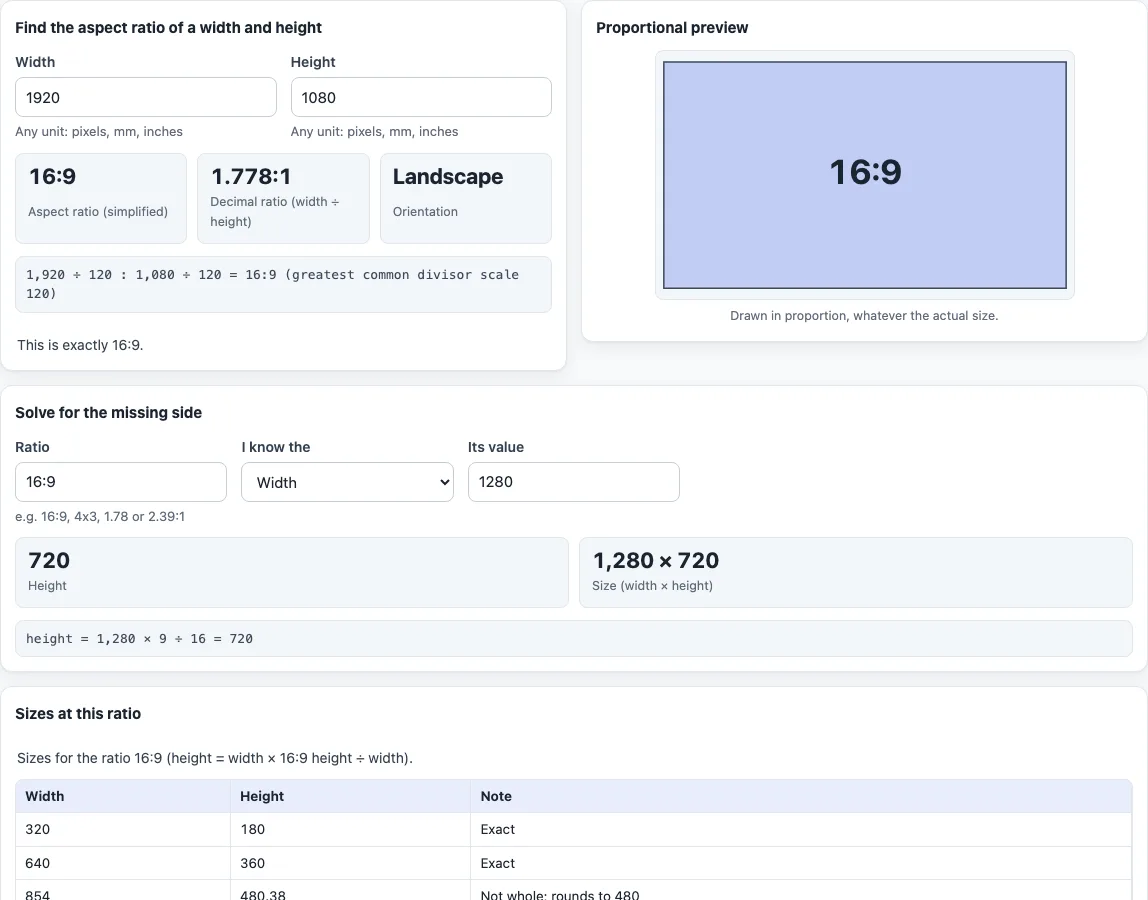
How to use the aspect ratio calculator
- Under “Find the aspect ratio of a width and height”, type the “Width” and “Height”. Any unit works as long as both use the same one.
- Read “Aspect ratio (simplified)”, the ratio in whole numbers. For example, 4000 by 3000 gives 4:3.
- Read “Decimal ratio (width ÷ height)” and “Orientation” (Landscape, Portrait or Square). Below them, a line shows the working, such as 1,920 ÷ 120 : 1,080 ÷ 120 = 16:9.
- Check the note under the results. It says “This is exactly” a well-known ratio, names the “Closest well-known ratio” and how far off it is, or says no well-known ratio is within 1 %.
- To solve a missing side, go to “Solve for the missing side”. Type a ratio in “Ratio” (16:9, 4x3, 16/9, 16 by 9, 1.78 or 2.39:1 all work), choose in “I know the” whether you have the Width or the Height, and enter “Its value”.
- Read the other side and the full “Size (width × height)”. For a 2.39:1 frame that is 1920 wide, the height is 803.35, and the page says it is not a whole number and offers 803 or 804.
- Scroll to “Sizes at this ratio” for a table of heights at common widths from 320 to 7680. A height that is not whole is marked “Not whole; rounds to” the nearest integer.
The table follows the ratio found from your width and height. Only when those fields are empty or invalid does it use the ratio typed in the solve box.
What is an aspect ratio?
An aspect ratio is the proportion between width and height, written width:height. It describes shape, not size, so a small and a large frame can share the same ratio. A ratio compares two lengths, so it has no unit and holds whether you measure in pixels, inches or millimetres.
How do you figure out an aspect ratio from a width and height?
Divide both numbers by their greatest common divisor (GCD), found with Euclid’s method. For 1920 by 1080 the GCD is 120, which gives 16:9. For 6000 by 4000 the GCD is 2000, which gives 3:2. If you enter decimals, the tool first scales them to whole numbers, using up to 6 decimal places.
Some sizes do not reduce to a familiar ratio. A 1366 by 768 size has a GCD of 2, so it simplifies to 683:384. The tool then reports 16:9 as the closest well-known ratio, off by 0.05 %.
How do you write an aspect ratio as a decimal?
Divide width by height. For 1920 by 1080, 1920 ÷ 1080 is about 1.778, so the ratio is 1.778:1. A bigger number means a wider shape: 2.39:1 is wider than 16:9, which is 1.778:1.
How do you find a missing width or height?
With a ratio and one side, the other side follows from two formulas:
- Height = width × ratio height ÷ ratio width
- Width = height × ratio width ÷ ratio height
At 2.39:1 and a width of 1920, the height is 1920 × 1 ÷ 2.39 = 803.35. At 16:9 and a width of 1280, the height is 720. The same formula answers a 16 by 9 question: at 16:9, a width of 1920 gives a height of 1080.
Which aspect ratios are common?
The “Common aspect ratios” table lists ten, with the decimal value of each:
- 3:2: classic 35 mm film cameras (36 × 24 mm frame).
- 4:3: Four Thirds and Micro Four Thirds cameras, and most digital compact cameras.
- 16:9: HDTV, the international standard format of HDTV.
- 1:1: a square frame.
- 5:4: fits an 8 × 10 in print without cropping.
- 16:10: computer displays and tablets.
- 2:1: phone displays advertised as 18:9, and the Univisium film format.
- 21:9: ultrawide gaming and desktop monitors.
- 2.39:1: anamorphic widescreen film, set by an SMPTE update and often rounded to 2.40:1.
- 9:16: vertical video for portrait viewing.
What does “closest well-known ratio” mean?
The tool compares your shape with 1:1, 5:4, 4:3, 3:2, 16:10, 16:9, 2:1, 21:9, 2.39:1 and the portrait versions of these. For each one it calculates the relative difference |W/H ÷ c − 1| and shows the closest only if it is within 1 %. That 1 % limit is this tool’s own rule, not an industry standard.
Frequently asked questions
Is the aspect ratio calculator free, and is anything uploaded?
It is free, runs in your browser and needs no sign-up. Nothing you type is uploaded, and the tool does not open image files.
Can I use any unit?
Yes. A ratio has no unit, so pixels, inches or millimetres all work, as long as width and height use the same one.
How do I enter 16 by 9?
In the “Ratio” box of the solve section, type 16:9, 16x9, 16/9 or 16 by 9. A single decimal such as 1.78 is read as 1.78:1.
Is this an aspect ratio generator?
It does not invent a ratio. You give it a size or a ratio, and it produces the simplified ratio, the missing side, or a table of sizes at that ratio.
How do I find the image ratio of a picture?
Look up the image’s width and height in pixels and type them in “Width” and “Height”. The tool does not read the file for you.
Why does the closest well-known ratio not appear?
The tool names one only when your shape is within 1 % of a ratio in its list. Otherwise it says no well-known ratio is that close.
Why does the sizes table say a height is not whole?
At some widths the exact height has a fraction. The table marks it and shows the nearest whole number, so you can see the ratio shifts slightly if you round.
Related tools
- 16:9 aspect ratio calculator: Crop or pad a frame to 16:9 and see standard 16:9 resolutions.
- Aspect ratio converter: Change a size to another ratio by cropping, padding or stretching.
- Image resizing calculator: Get a new pixel size that keeps the proportions.
- Screen aspect ratio calculator: Work out a display’s ratio, physical size and pixel density.
- Pixel aspect ratio calculator: Check the shape of the pixels themselves.