16 9 Aspect Ratio Calculator
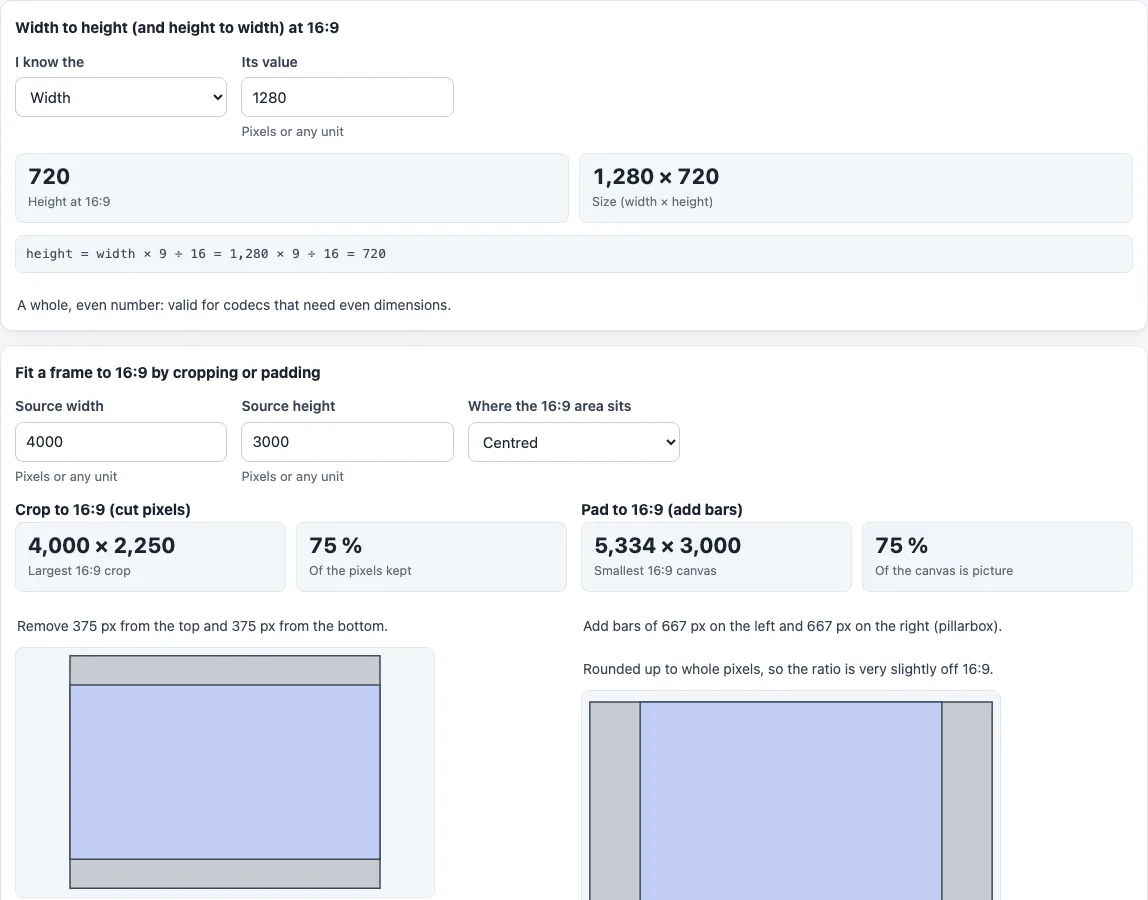
Type a width or a height to get the matching 16:9 size, or enter any image or video size to crop or pad it to 16:9.
This 16 9 aspect ratio calculator gives the height for any width, or the width for any height, at exactly 16:9. It also takes any source size and shows the largest 16:9 crop and the smallest 16:9 canvas that holds it, with the pixels removed or added on each side.
It is an aspect ratio 16 9 calculator for pixel sizes of video, thumbnails and screens: type 1280 and it returns 720, type 1080 and it returns 1920 as the width. A table lists standard 16:9 resolutions from 640 × 360 to 7680 × 4320. It runs in your browser, it is free, and nothing you type is uploaded. It works with numbers only and does not open image or video files.
How to use the 16:9 aspect ratio calculator
- Under “Width to height (and height to width) at 16:9”, set “I know the” to Width or Height and enter the number in “Its value”. Pixels or any unit work.
- Read “Height at 16:9” or “Width at 16:9”, plus the full “Size (width × height)” and the working line, such as height = width × 9 ÷ 16.
- Read the note below. A whole, even result is marked as valid for codecs that need even dimensions. A whole but odd result is flagged, and a result with a fraction shows the nearest even values.
- To fit an existing frame, go to “Fit a frame to 16:9 by cropping or padding”. Enter “Source width” and “Source height”.
- Choose “Where the 16:9 area sits”: “Centred”, “Top / left edge” or “Bottom / right edge”. It decides how the cut or the bars are split between the two sides.
- Read “Largest 16:9 crop” and “Of the pixels kept” under “Crop to 16:9 (cut pixels)”, then “Smallest 16:9 canvas” and “Of the canvas is picture” under “Pad to 16:9 (add bars)”. Both are shown together, so you can compare them.
- If the frame is already 16:9 the page says “Already 16:9, nothing to change.” A drawing under each result shows the kept area or the picture inside its bars, to scale, with a caption explaining the shading.
- The “Standard 16:9 resolutions” table at the bottom lists the size, name, megapixels and whether each is exactly 16:9.
How does a 16 9 aspect calculator work?
A 16:9 frame is 16 units wide for every 9 units high. The tool uses that rule to find the missing side:
- Height = width × 9 ÷ 16
- Width = height × 16 ÷ 9
A width of 1280 gives a height of 720, and a width of 1920 gives 1080. The 16x9 calculator is exact only when the result is a whole number: a width of 1000 gives 562.5, so the tool offers the nearest even heights, 562 and 564. Many video codecs need even dimensions, which is why even values are shown.
What are the standard 16:9 resolutions?
The “Standard 16:9 resolutions” table lists, with names from the Wikipedia list of graphics display resolutions:
- 1280 × 720: HD
- 1920 × 1080: FHD
- 2560 × 1440: QHD
- 3840 × 2160: 4K UHD
- 5120 × 2880: 5K
- 7680 × 4320: 8K UHD
- 640 × 360: exactly 16:9, but no standard name in that list, so a dash is shown
The table also gives megapixels and checks each size. 854 × 480 (FWVGA) is only approximately 16:9: 854 × 9 ÷ 16 is 480.375, so the table says “No, approximately” and shows the exact height at that width.
How do you crop an image to 16:9?
Cropping removes pixels until the frame is 16:9. If width ÷ height is greater than 16 ÷ 9, the full height is kept and the width becomes floor(height × 16 ÷ 9). Otherwise the full width is kept and the height becomes floor(width × 9 ÷ 16). The cut is split by the position you chose.
A 4000 × 3000 frame crops to 4000 × 2250. The tool says to remove 375 px from the top and 375 px from the bottom, and 75 % of the pixels are kept. Because the crop is rounded down to whole pixels, a note warns when the result is very slightly off 16:9.
How do you pad an image to 16:9?
Padding adds bars until the frame is 16:9. The tool finds the smallest 16:9 canvas that contains the frame, rounding up, and the bars are the difference. Bars on the left and right are a pillarbox; bars on the top and bottom are a letterbox.
A 4000 × 3000 frame needs a 5334 × 3000 canvas, with 667 px bars on the left and right, and the picture is 75 % of the canvas. A 1080 × 1080 square pads to 1920 × 1080, with 420 px on each side.
What about a 16x9 screen size?
This page works in pixels or any unit and never knows the physical size of a screen. For the width and height of a 16:9 panel from its diagonal, use the screen aspect ratio calculator linked below.
Frequently asked questions
Is the 16:9 calculator free, and is anything uploaded?
It is free, runs in your browser and needs no sign-up. Nothing you type is uploaded, and the tool does not open or change files.
Why does it show two heights for some widths?
When the exact height has a fraction, such as 562.5 for a width of 1000, the tool shows the nearest even whole numbers, 562 and 564, because many video codecs need even dimensions.
Why is 854 × 480 not exactly 16:9?
854 × 9 ÷ 16 is 480.375, not 480. The size is close to 16:9, so the table marks it as approximate.
Is 640 × 360 a 16:9 size?
Yes. 640 × 9 ÷ 16 is exactly 360. It has no standard name in the list the table uses, so the name column shows a dash.
What 16:9 size should my width become?
Type the width under “I know the” Width and read “Height at 16:9”. For example 1920 gives 1080, 2560 gives 1440 and 3840 gives 2160.
What do letterbox and pillarbox mean?
Both are padding bars. Letterbox bars sit at the top and bottom, and pillarbox bars sit at the left and right.
Does the crop choice look at what is in the picture?
No. Cropping and padding are geometric, based only on the numbers you enter. “Where the 16:9 area sits” moves the kept area or the bars but does not detect any content.
Related tools
- Aspect ratio calculator: Find the ratio of any width and height, or solve for a different ratio.
- Aspect ratio converter: Convert a size to 1:1, 4:5, 4:3 or any other ratio by cropping, padding or stretching.
- Image resizing calculator: Scale an image to a new width, height or box while keeping its proportions.
- Screen aspect ratio calculator: Get a screen’s physical width, height and pixel density from its diagonal.
- Pixel aspect ratio calculator: Check the shape of the pixels in a video frame.