Angle of View Calculator
Turn a focal length into an angle of view, or pick the angle you need and get the lens focal length for your sensor.
An angle of view calculator converts a focal length into the angle a lens covers on a given sensor, and converts a wanted angle back into the focal length you need. This camera lens angle of view calculator gives the horizontal, vertical and diagonal angle, the full-frame equivalent focal length, and a table of common lenses from 14 to 600 mm.
It runs in your browser, it is free, and nothing you type is uploaded. Both directions, focal length to angle and angle to focal length, are on the same page, so you can check a lens you own or work out which lens you should buy before you spend any money.
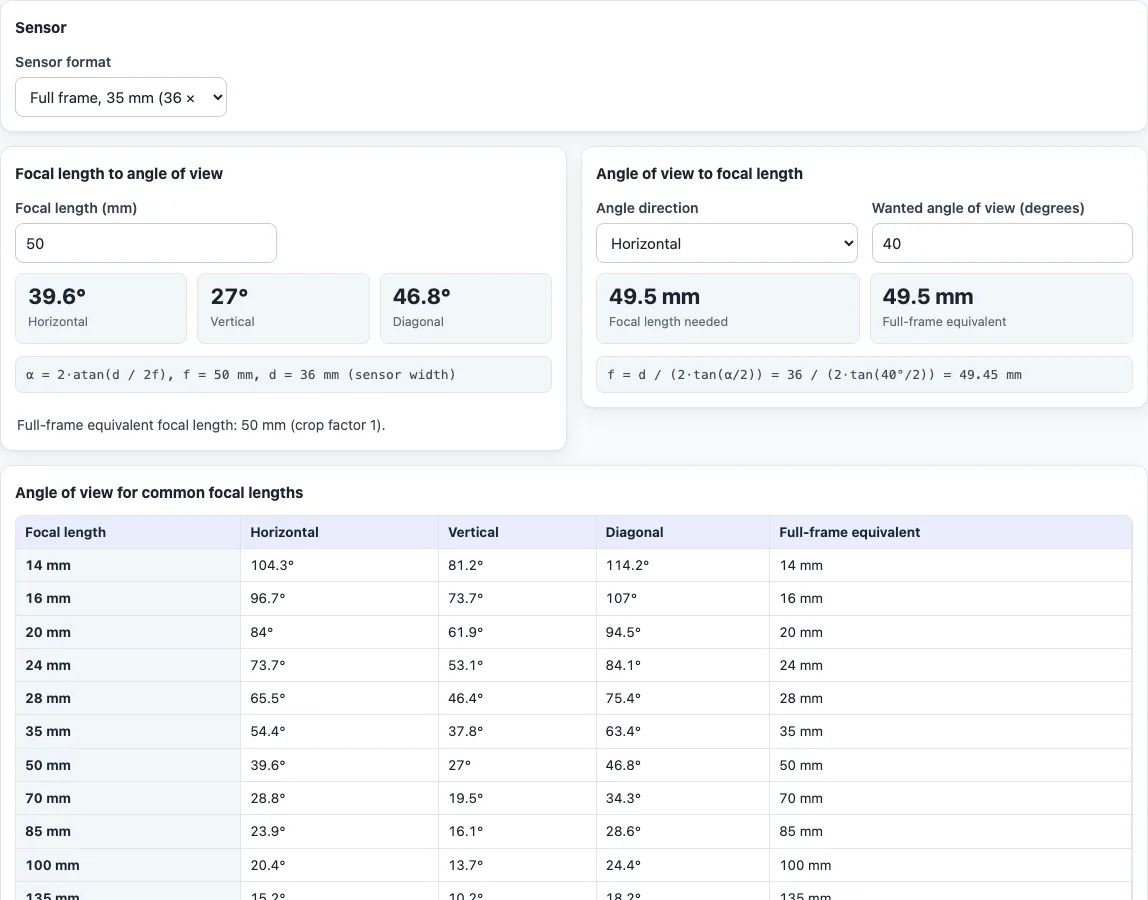
How to use the angle of view calculator
- Under “Sensor”, choose your camera in “Sensor format”, or pick “Custom size (enter width × height)” and type the sensor width and height in millimetres.
Focal length to angle of view
- In “Focal length to angle of view”, type the “Focal length (mm)”.
- Read “Horizontal”, “Vertical” and “Diagonal”. The working, α = 2·atan(d / 2f), is shown under them with your numbers, together with the full-frame equivalent focal length.
Angle of view to focal length
- In “Angle of view to focal length”, set “Angle direction” to “Horizontal”, “Vertical” or “Diagonal”.
- Type the “Wanted angle of view (degrees)”. It must be above 0 and below 180.
- Read “Focal length needed” and its “Full-frame equivalent”. The formula f = d / (2·tan(α/2)) is shown under them.
The table “Angle of view for common focal lengths” sits below the two blocks and updates whenever you change the sensor. It lists 14, 16, 20, 24, 28, 35, 50, 70, 85, 100, 135, 200, 300, 400, 500 and 600 mm with the three angles and the full-frame equivalent for your sensor.
Both blocks use the same sensor, so change it once and every result follows. Example: on full frame (36 × 24 mm), a 50 mm lens gives 39.6° horizontal, 27.0° vertical and 46.8° diagonal. Asking for a 40° horizontal angle gives a focal length of 49.5 mm. On the 23.6 × 15.6 mm APS-C entry the same 40° needs 32.4 mm, which is 49.6 mm in full-frame terms.
What is angle of view?
Angle of view is the angle between the two edges of the scene that a lens and sensor record. It is measured across the sensor width, height or diagonal, so one lens has three angles. A short focal length gives a wide angle, and a long one gives a narrow angle.
How do you calculate the angle of view from the focal length?
Use α = 2·atan(d / 2f), where d is the sensor dimension in the chosen direction and f the focal length, both in millimetres. For a 24 mm lens on 36 × 24 mm the horizontal angle is 73.7°, for 85 mm it is 23.9°, and for 200 mm it is 10.3°. Wikipedia’s article on angle of view lists the same values for these lenses. The formula is valid for a rectilinear lens focused at infinity.
How do you find the focal length for a wanted angle of view?
Rearrange the same formula: f = d / (2·tan(α/2)). A 90° horizontal angle on full frame needs 18 mm, and 10° needs about 206 mm. Choose the direction first, because the same lens covers a different angle across the width, the height and the diagonal.
How does the table help?
It shows the angles for 16 common focal lengths on your sensor, so you can spot the neighbours of a lens at a glance. On full frame 28 mm gives 65.5° horizontal and 35 mm gives 54.4°. Changing the sensor changes every row, including the “Full-frame equivalent” column.
Why does a smaller sensor give a narrower angle?
The same lens projects the same image, and a smaller sensor records only the middle of it. A 50 mm lens gives 39.6° horizontal on full frame and 26.6° on the 23.6 × 15.6 mm APS-C entry. The tool shows the full-frame equivalent focal length, the focal length times the crop factor, so you can compare sensors with one number.
How exact are the results?
Real lenses can differ from the formula by a few percent, and the sensor sizes in the list are nominal. Focusing closer also narrows the angle. The tool does not cover fisheye or other curvilinear lenses or lens distortion.
Frequently asked questions
Is the angle of view calculator free, and is anything uploaded?
It is free and needs no account. Everything runs in your browser, and nothing you type is uploaded.
Is this a focal length to angle of view calculator and an angle of view to focal length calculator?
Yes, both. The left block takes a focal length and gives angles, and the right block takes an angle and gives the focal length.
Why are there three angles for one lens?
The sensor is wider than it is tall, and its diagonal is longer than both. For a 50 mm lens on 36 × 24 mm the angles are 39.6°, 27.0° and 46.8°. The tool shows all three so you can match whichever one your source uses.
Can I use it for a CCTV or security camera?
The tool is built for photography lenses and does not select security camera lenses. If you know the sensor size in millimetres you can use “Custom size (enter width × height)” to get the geometric angle for a rectilinear lens.
Can I use a sensor that is not in the list?
Yes. Choose “Custom size (enter width × height)” and type the sensor width and height in millimetres.
What is the difference from the field of view calculator?
This page works with angles and focal lengths. The field of view calculator also gives scene width and height at a subject distance.
Related tools
- Field of view calculator adds the scene width and height at a subject distance.
- Crop factor calculator gives the crop factor behind the full-frame equivalent.
- Depth of field calculator shows how much of the scene is sharp at your aperture and distance.
- Hyperfocal distance calculator finds the focus distance that reaches infinity.