Aperture, Shutter Speed and ISO Chart
Choose a scene or an EV and get a printable grid of shutter speeds for each aperture and ISO that give the same exposure.
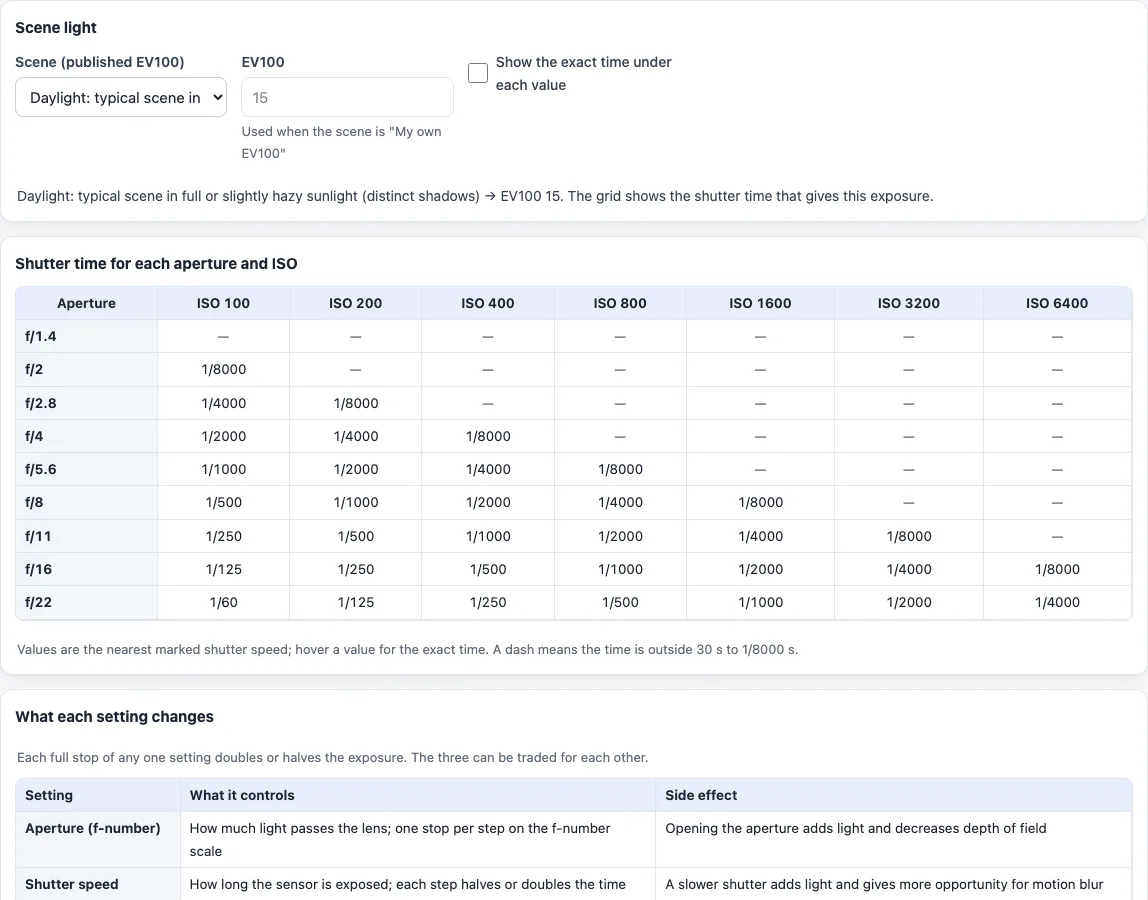
An aperture shutter speed ISO chart is a grid that shows the shutter speed that gives the same exposure for every aperture and ISO. Pick a scene brightness, or type your own EV100, and this one builds the grid: f-numbers down the side, ISO 100 to 6400 across the top, a shutter time in each cell.
It works as an aperture and shutter speed cheat sheet that you can print from the browser, and the result is the same however you read it: f-stop and shutter speed on one page, with the ISO added as a third setting. It is free, runs in your browser and uploads nothing.
How to use the aperture, shutter speed and ISO chart
- Under “Scene light” choose a scene in “Scene (published EV100)”. Each choice ends with its EV100, for example “typical scene in full or slightly hazy sunlight (distinct shadows) — EV100 15”. For a brightness that is not in the list, choose “My own EV100” and type a number in “EV100”.
- Read the grid under “Shutter time for each aperture and ISO”. Rows are the full-stop apertures f/1.4 to f/22. Columns are “ISO 100” to “ISO 6400”, one stop apart.
- Find your aperture row and ISO column. The cell is the nearest marked shutter speed for that scene.
- Hover over a cell to see the exact time, or tick “Show the exact time under each value” to print the exact time below every cell.
- A dash means the time falls outside 30 s to 1/8000 s. Hover over it for the exact time.
- To trade settings, move along a row to see how a change of ISO moves the shutter speed, or down a column to see how a change of aperture does. Every cell on the grid gives the same exposure.
- Print the page from your browser to keep the chart. The print view holds the grid and the table “What each setting changes”.
How do aperture, shutter speed and ISO work together?
Each setting changes the exposure, and each full stop doubles or halves the light. The table “What each setting changes” lists the trade-offs:
- Aperture: opening it adds light and decreases depth of field.
- Shutter speed: a slower shutter adds light and gives more opportunity for motion blur.
- ISO: a higher ISO needs less exposure for a readable image, so it allows faster shutters or smaller apertures.
Because one stop of any setting cancels one stop of another, the three can be swapped. That is what the grid shows.
What does an f-stop chart with shutter speed tell you?
An f-stop is the f-number of the lens opening, such as f/2.8 or f/8. A smaller number is a wider opening and more light. The rows step by one full stop, for example f/8 to f/11, which halves the light. Along a row the shutter time halves for each step to the right, because each ISO column is one stop more sensitive.
How is each shutter speed in the chart calculated?
Each cell is t = N² / 2^(EV100 + log2(ISO / 100)), where N is the f-number, t is in seconds and EV100 is the scene value. For EV100 15, f/16 and ISO 100 the exact time is 1/128 s, shown as the marked value 1/125. At ISO 400 it is 1/512 s, shown as 1/500.
Some more cells at EV100 15: f/8 and ISO 100 gives 1/500, and f/22 and ISO 100 gives 1/60. At EV100 12, which is heavy overcast, f/22 and ISO 100 gives 1/8.
What is EV100 and which scene has which value?
EV100 describes how bright a scene is, using ISO 100 as the reference. The scene list uses single values from the table in the Wikipedia article on exposure value. They are rounded guides, so treat them as a starting point:
- EV100 16: light sand or snow in full or slightly hazy sunlight.
- EV100 15: a typical scene in full or slightly hazy sunlight.
- EV100 13: cloudy bright, no shadows.
- EV100 12: heavy overcast.
- EV100 9: night sports.
- EV100 5 to 7: home interiors.
Where the published table gives a range, the list has the two ends as separate choices, for example offices at 8 and at 7.
Is there a beginner aperture shutter speed ISO chart?
The same grid works for a beginner. Start with the default daylight scene, pick the aperture you want for the look of the shot, and read the shutter speed in the ISO 100 column. If it is too slow for your subject, move one column to the right: the shutter time halves, at the price of a higher ISO.
Frequently asked questions
Is the aperture shutter speed ISO chart free?
Yes. It is free, needs no account and runs in your browser. Nothing you type is uploaded.
Can I print it as a cheat sheet?
Yes. Use your browser’s print command. The print view holds the scene line, the grid and the table of what each setting changes.
Why does a cell show a dash?
The exposure needed for that aperture and ISO falls outside 30 s to 1/8000 s. Hover over the dash to see the exact time, or choose another aperture or ISO.
Is this a light meter?
No. The scene values are rounded guides from a published table. Check the result on your camera.
Does the chart cover flash or long exposures?
No. It has no flash mode and no reciprocity-failure correction for long exposures.
Why are the shutter speeds not the same as the exact times?
The grid shows the nearest marked shutter speed from the 1/3-stop scale used on cameras, for example 1/125 instead of 1/128. The exact time is in the hover text.
Do I need to install anything?
No. The chart runs in your browser on this page, with no app and no account.
How do the three settings relate?
Aperture, shutter speed and ISO each change exposure in stops. Opening the aperture by one stop, doubling the shutter time or doubling the ISO each give twice the light in the picture.
Related tools
- Shutter speed chart: every full-stop shutter speed with its exact time and a handheld limit calculator.
- Exposure value calculator: turn your own settings into an EV and compare two exposures in stops.
- Exposure calculator: keep the same exposure while changing one setting, with an optional ND filter.
- Sunny 16 rule calculator: the daylight starting exposure from the Sunny 16 rule.
- Depth of field calculator: how the aperture changes the zone that looks sharp.