Depth of Field Calculator
Choose your sensor, focal length, aperture and subject distance to see how much of the scene is acceptably sharp.
A depth of field calculator (DOF calculator) tells you how much of a scene, from front to back, will look acceptably sharp for a given sensor, focal length, aperture and subject distance. This one shows the near limit, the far limit, the total depth of field and the hyperfocal distance, and the same page works as a depth of field chart for every aperture from f/1.4 to f/22.
It runs in your browser, it is free, and nothing you type is uploaded. If you searched for a deep of field calculator, a camera depth of field calculator or a depth of field calculator online, this is the tool. Pick your own sensor, including Nikon DX or Canon APS-C, and the numbers follow.
How to use the depth of field calculator
- Choose your camera under “Sensor format”. If yours is not listed, pick “Custom size (enter width × height)” and type the sensor width and height in millimetres.
- Type the “Focal length (mm)” of the lens, for example 50.
- Type the “Aperture (f-number)”. For f/2.8 enter 2.8.
- Type the “Subject distance” and set “Distance unit” to “Metres” or “Feet”. The distance is measured from the lens, not from the sensor.
- Leave “Circle of confusion (CoC)” on “Sensor diagonal ÷ 1500 (default)”, or switch to “0.030 mm (classic full-frame value)” or “Enter my own” and type the CoC in µm.
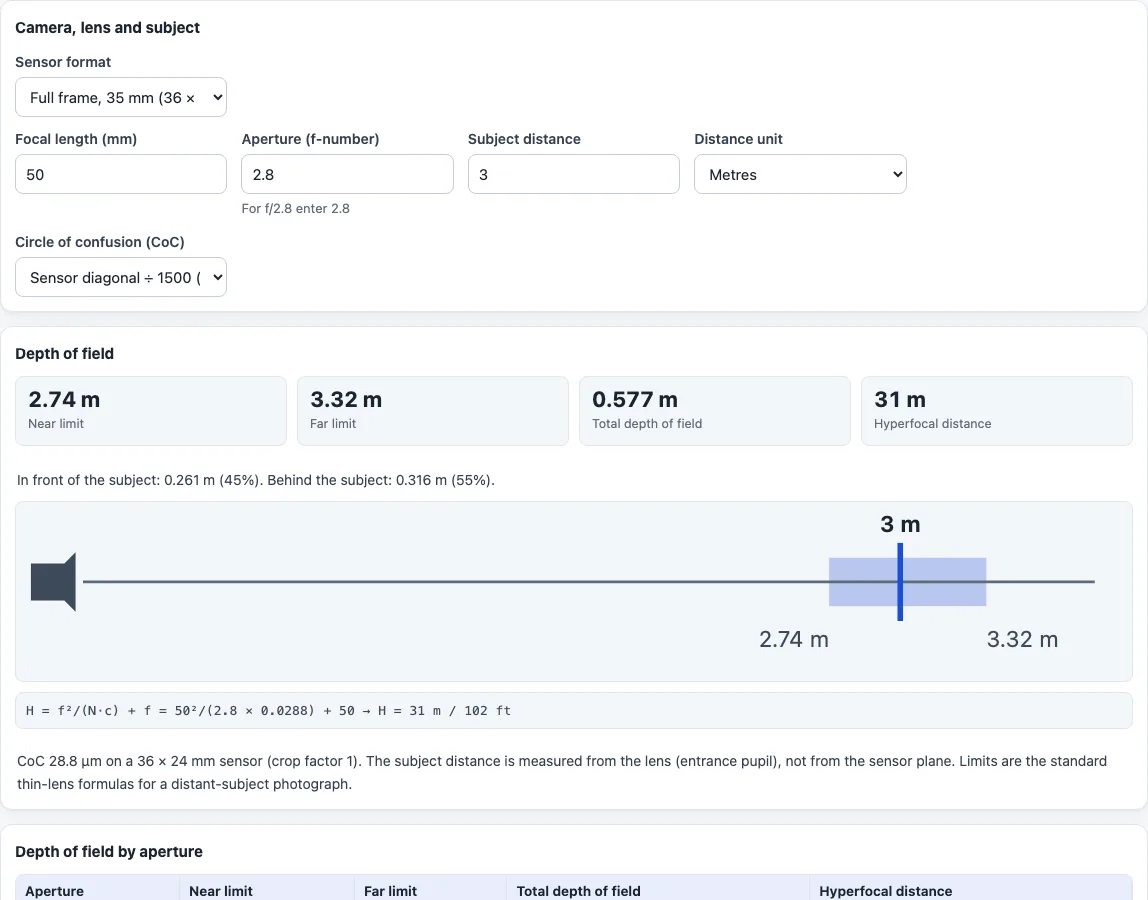
- Read “Near limit”, “Far limit”, “Total depth of field” and “Hyperfocal distance”. A line below says how much of the zone lies in front of the subject and how much behind, as percentages, and a small diagram shows the zone around the subject. If the far limit is infinity, the page says the subject is at or beyond the hyperfocal distance.
- Scroll to “Depth of field by aperture”. It repeats the calculation for f/1.4, 2, 2.8, 4, 5.6, 8, 11, 16 and 22 with your other settings, so you can compare apertures in one table. Use “Print” to print the result and the table.
Example: full frame, 50 mm, f/2.8, subject at 3 m, default CoC (0.0288 mm). The near limit is 2.74 m, the far limit 3.32 m, the total 0.577 m, and the hyperfocal distance 31.0 m. About 45 % of the zone is in front of the subject and 55 % behind.
What is depth of field?
Depth of field is the range of distances in front of and behind your focus point that looks acceptably sharp in the photo. Only one distance is perfectly in focus. Sharpness falls off gradually on either side, and inside the zone the blur is smaller than the circle of confusion, the largest blur spot still counted as a point.
What changes depth of field?
Aperture, focal length, subject distance and sensor size. A larger f-number gives more depth of field, a longer lens gives less at the same distance, and a closer subject gives less. For the same framing and f-number, a smaller sensor gives more.
You can see this by changing one field at a time. In the example above, going from f/2.8 to f/8 at 3 m widens the total from 0.577 m to 1.77 m. Going to f/22 gives 10.2 m, with a far limit near 11.9 m.
How is depth of field calculated?
The tool first finds the hyperfocal distance, H = f²/(N·c) + f, where f is the focal length, N the f-number and c the circle of confusion. With s the subject distance, it then uses near = s(H − f)/(H + s − 2f) and far = s(H − f)/(H − s). When s is at or beyond H the far limit is infinity. The hyperfocal formula is shown under the result with your numbers filled in.
The default CoC is the sensor diagonal divided by 1500, which is 0.029 mm on full frame. That is a convention, not a law of physics, which is why you can change it. A smaller CoC gives a shallower zone.
Why is more of the zone behind the subject?
The far limit moves away faster than the near limit comes closer, so the zone reaches farther behind the subject than in front of it. The front and behind percentages under the result show the split for your settings. At f/2.8 in the example it is 45 % and 55 %, and it tilts further behind as you focus farther away.
Is this the same as a depth of field chart?
The table “Depth of field by aperture” is a depth of field chart: one row per aperture with near, far, total and hyperfocal distance. A chart always depends on the CoC it was built with, and here you choose the CoC yourself.
What does the calculator not do?
It does not model diffraction, close-up or macro corrections, or focus breathing, and it does not take print size or viewing distance as input. Treat the result as a planning estimate, because what counts as acceptably sharp depends on the CoC you choose.
Frequently asked questions
Is the depth of field calculator free, and is anything uploaded?
It is free and needs no account. Everything is computed in your browser, and nothing you type is uploaded.
Is a DOF calculator the same as a depth of field calculator?
Yes. DOF is the usual abbreviation for depth of field, so both names describe the same tool.
Which sensor should I choose for Canon or Nikon?
Choose the format that matches your body. The list has Full frame, APS-C (Nikon DX, Sony, Fujifilm X, Pentax), APS-C Canon, APS-H Canon, Micro Four Thirds and others, and you can also enter a custom size.
Does a wider aperture give less depth of field?
Yes, with everything else unchanged. A smaller f-number means a wider opening and a shallower zone, as the “Depth of field by aperture” table shows.
Why does the far limit show ∞?
Your subject is at or beyond the hyperfocal distance for that focal length, aperture and CoC. Everything from the near limit to infinity is then inside the zone.
Can I use feet instead of metres?
Yes. Set “Distance unit” to “Feet” and the distance you type and the results are in feet.
Does the result change with the sensor?
Yes. For the same lens, aperture and distance, a different sensor gives a different depth of field, so choose the sensor that matches your camera.
Related tools
- Hyperfocal distance calculator finds the focus distance at which the far limit reaches infinity.
- Field of view calculator gives the scene width and height your lens covers at a distance.
- Angle of view calculator converts between focal length and angle of view.
- Crop factor calculator compares sensor sizes and gives full-frame equivalents.
- Exposure value calculator turns aperture, shutter time and ISO into an exposure value.