Exposure Calculator
Start from one exposure, change a setting, and see what the others must become. Includes an ND filter time calculator.
This exposure calculator keeps the same exposure while you change the aperture, the shutter time or the ISO. Enter one reference exposure, say which setting to solve for, and it returns the value that gives the same picture brightness. It works as a camera exposure calculator, a photo exposure calculator and an exposure triangle calculator for the three settings, and it adds an ND filter for long-exposure times.
It is for camera exposure only. If you searched for a silk screen or screen printing exposure calculator, a 21-step wedge or an Anthem or Chromaline stencil time, this page does not calculate those.
It runs in your browser, it is free, and nothing you type is uploaded.
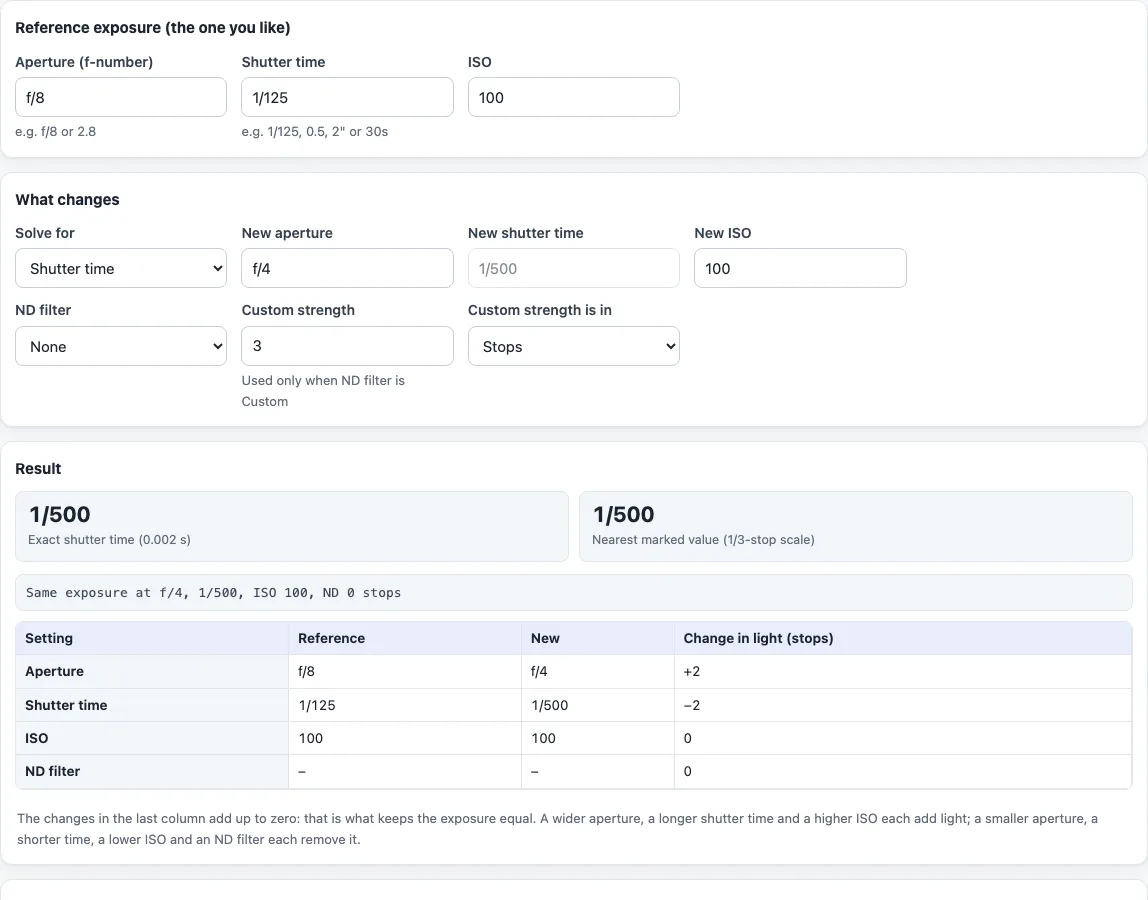
How to use the exposure calculator
- Under “Reference exposure (the one you like)” enter the “Aperture (f-number)”, the “Shutter time” and the “ISO” of an exposure you are happy with. The shutter time accepts forms such as 1/125, 0.5, 2" or 30s.
- Under “What changes”, pick the setting to find in “Solve for”: “Shutter time”, “Aperture” or “ISO”. The matching field is greyed out because the tool fills it in.
- Fill in the other two “New” fields: “New aperture”, “New shutter time” and “New ISO”.
- To add a filter, choose it from “ND filter”, from “ND2” to “ND10000”. The filter applies to the new exposure only, not to the reference.
- For a strength not in the list, choose “Custom (use the two fields on the right)”. Type the number in “Custom strength” and pick the unit in “Custom strength is in”: “Stops”, “Filter factor (e.g. 64)” or “Optical density (e.g. 1.8)”. For stacked filters, add their stops together and enter the total as stops.
- Read the “Result”. The first figure is the exact value. “Nearest marked value (1/3-stop scale)” is the closest figure printed on a camera dial or lens.
- The table below shows the reference, the new value and the “Change in light (stops)” for each setting. The last column adds up to zero, which is what keeps the exposure equal.
Open “ND filter names, factors and stops” for a table of the filters the tool knows. Shutter times over 60 seconds are shown in minutes, seconds or hours.
How does changing one exposure setting affect the others?
Each stop doubles or halves the light. A wider aperture adds light and reduces depth of field. A slower shutter adds light and gives more chance of motion blur. A higher ISO means the camera needs less light for a readable image, and many cameras show more noise at high ISO.
Take f/8, 1/125 s, ISO 100. Solving for the shutter time at f/4 and ISO 100 gives 1/500 s: two stops of aperture are paid back by two stops of time. Solving for the ISO at f/8 and 1/250 s gives ISO 200. Solving for the aperture at 1/500 s and ISO 100 gives f/4.
What formula keeps the exposure equal?
The tool keeps t × ISO / N² / 2^nd constant, where t is the time in seconds, N the f-number and nd the stops of ND filter. This follows from the definition of exposure value; it is not a quoted formula. Solved for each setting:
- Shutter: t2 = t1 × (N2 / N1)² × (ISO1 / ISO2) × 2^nd
- Aperture: N2 = N1 × √((t2 × ISO2 / 2^nd) / (t1 × ISO1))
- ISO: ISO2 = ISO1 × (N2 / N1)² × (t1 / t2) × 2^nd
How do you calculate shutter speed with an ND filter?
Set “Solve for” to “Shutter time”, keep the aperture and ISO the same, and choose the filter. A filter of s stops multiplies the time by 2^s. With f/8, 1/125 s, ISO 100 and a 10-stop filter the time is 1024 / 125 = 8.19 s. With f/2.8, 1/60 s, ISO 100 and a 6-stop filter it is 1.07 s.
How many stops is an ND filter?
Stops = log2(factor), and factor = 10^OD = 2^stops, so one stop is an optical density of about 0.30. ND64 is 6 stops, and ND10000 (OD 4.0) is about 13 1/3 stops. ND1000 is listed in the Wikipedia article next to ND1024, which is 10 stops. The tool uses the exact factor of 1000, which is 9.97 stops, so the 10-stop example above gives 8.19 s and ND1000 gives 8 s.
Manufacturers label strengths in different ways (ND 0.3, ND2, ND101, 1x), so check what is printed on the filter before you choose.
Frequently asked questions
Is the exposure calculator free?
Yes. It is free, needs no account and runs in your browser. Nothing you type is uploaded.
Does it calculate screen printing exposure time?
No. It covers camera exposure only. Screen exposure time for a stencil is a different problem and is not calculated here.
What does “Nearest marked value” mean?
The exact result comes straight from the formula, for example 8.19 s or f/2.83. The marked value is the nearest figure on the 1/3-stop scale used on cameras, so you can set it on a dial.
Why might a long exposure look different from the calculated time?
The tool applies no reciprocity-failure correction, and film and digital sensors respond differently. Treat the result as a starting point, test it and bracket around it.
Does it handle variable ND filters or colour casts?
No. Only the stops you enter are used. Variable ND filters, colour casts and filters stacked on one lens beyond adding their stops are not modelled.
How many stops is ND1000?
The tool uses 9.97 stops, which is log2(1000). A filter sold as ND1024 is 10 stops.
How many stops is ND8 or ND64?
ND8 is 3 stops and ND64 is 6 stops, because each doubling of the filter factor adds one stop.
Do I need to install anything?
No. The tool runs in your browser on this page, with no app and no account.
Related tools
- Exposure value calculator: turn settings into an EV and compare two exposures in stops.
- Shutter speed chart: the full-stop and 1/3-stop shutter scales with exact times.
- Aperture, shutter speed and ISO chart: a grid of shutter times for each aperture and ISO at a chosen EV100.
- Sunny 16 rule calculator: a daylight starting exposure from the Sunny 16 rule.
- Depth of field calculator: how the aperture changes the zone that looks sharp.
- Time lapse calculator plans photos, clip length and card space for a time lapse.