Exposure Value Calculator
Enter an aperture, a shutter time and an ISO to get the EV, or pick an EV to see every aperture and shutter pair that matches.
An exposure value calculator turns an aperture, a shutter time and an ISO into one number, the exposure value (EV). This one also runs the other way: give it an EV and it lists every aperture and shutter pair that gives the same exposure, and it compares two sets of settings in stops.
It runs in your browser, it is free, and nothing you type is uploaded. The result comes with EV100, the same light level normalised to ISO 100, so settings made at different ISOs can be compared on one scale. Aperture, shutter time and ISO are all handled on the same page.
How to use the exposure value calculator
The page has three blocks. Each one updates as you type.
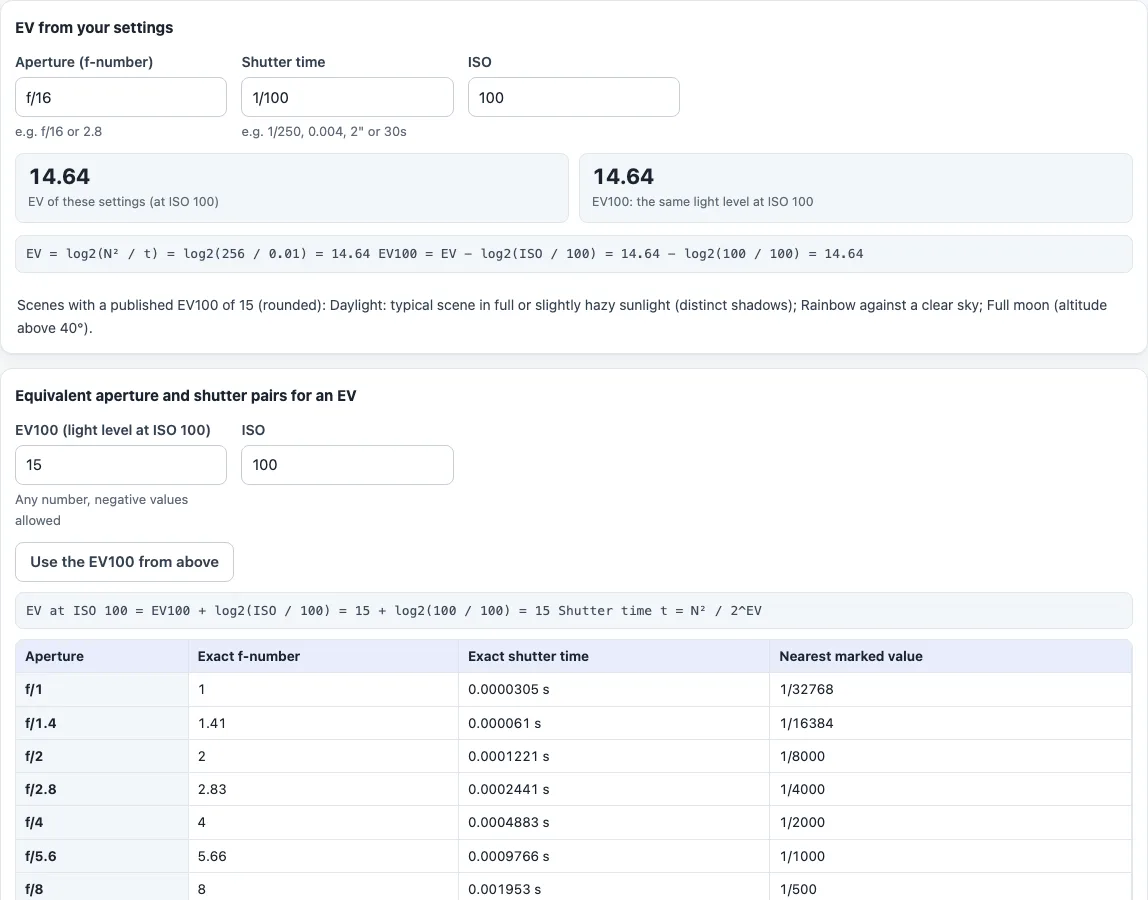
EV from your settings
- Type the “Aperture (f-number)”, for example f/16, F2.8, 2.8 or 2,8.
- Type the “Shutter time”, for example 1/250, 0.004, 2", 30s, 2 min or 1 h.
- Type the “ISO”.
- Read “EV of these settings (at ISO …)” and “EV100: the same light level at ISO 100”. Under them the tool shows the working, EV = log2(N² / t), and the published scenes whose EV100 matches yours after rounding.
Equivalent aperture and shutter pairs for an EV
- Type a number in “EV100 (light level at ISO 100)”, or press “Use the EV100 from above” to carry over the value from the first block. Negative values are allowed.
- Set the “ISO” you will shoot at.
- Read the table: one row per full-stop aperture from f/1 to f/32, with the “Exact f-number”, the “Exact shutter time” and the “Nearest marked value”. Every row gives the same exposure.
Difference between two exposures
- Exposure A is the settings from the first block.
- Fill in “Exposure B aperture”, “Exposure B shutter time” and “Exposure B ISO”.
- Read “Difference in stops” and “Difference in light”. The sentence under them says whether B records more or less light than A.
Typed f-numbers are used as typed, so f/11 counts as 11. The table uses exact stop values (powers of the square root of 2), so its f/11 row means 11.31. The two differ by about 0.04 stop.
What is exposure value (EV)?
Exposure value is one number that stands for an aperture and shutter time together. It is defined as EV = log2(N² / t), where N is the f-number and t the time in seconds. EV 0 is 1 second at f/1.0.
Each step of 1 EV is one stop, a factor of 2 in light. A higher EV means a shorter time or a smaller aperture, so less light reaches the sensor. As an example, f/16 at 1/100 s gives log2(256 / 0.01) = EV 14.64.
How do you calculate EV from aperture, shutter speed and ISO?
Square the f-number, divide by the time in seconds and take the base-2 logarithm. That gives the EV of the settings at the ISO you typed. To compare scenes independently of ISO, subtract log2(ISO / 100) to get EV100.
For f/8 at 1/125 s and ISO 400 the tool shows EV 12.97 and EV100 10.97. ISO 400 is two stops above ISO 100, so EV100 is 2 lower than the EV of the settings. ISO 50 goes the other way: EV100 is 1 higher.
What shutter speed and aperture give a certain EV?
For an EV at your ISO and an aperture N, the time is t = N² / 2^EV. The second block does this for the full-stop apertures. For EV100 15 at ISO 100 and f/16 the exact time is 1/128 s, and the nearest marked value is 1/125 s.
The “Exact shutter time” column is the maths. The “Nearest marked value” column is the closest figure on the 1/3-stop scale most cameras use. Times longer than 30 s or faster than 1/8000 s are shown exactly instead of as a marked value.
How many stops apart are two exposures?
The difference is log2(t × ISO / N²) for B minus the same for A. A positive result means B records more light. Take A as f/8, 1/125 s, ISO 100. With B at f/8, 1/250 s, ISO 100 the tool reports 1 stop, and B records less light. With B at f/4 and the same time and ISO it reports 2 stops, and B records more light, a factor of 4.
Which EV100 matches which kind of scene?
Open “Typical scene EV100 values” to see the full table. It is taken from the Exposure value article on Wikipedia, rounded, and meant as a guide, not a measurement. For example, a typical scene in full or slightly hazy sunlight with distinct shadows is listed at EV100 15, heavy overcast at 12, and home interiors at 5 to 7. The table ignores colour shift and reciprocity failure.
Frequently asked questions
Is the exposure value calculator free?
Yes. It is free, needs no account, and runs in your browser. Nothing you type is uploaded.
What is the difference between EV and EV100?
EV is the value for the ISO you typed. EV100 is the same light level at ISO 100. The two are equal when the ISO is 100 and differ by log2(ISO / 100) otherwise.
Does it work out a correct exposure from a light meter reading?
No. It does no luminance or reflected-light meter calibration, and it has no flash mode. It only converts between aperture, shutter time, ISO and EV.
Does it correct for long exposures?
No. There is no reciprocity-failure correction, so very long times need to be adjusted by you.
Why is “Nearest marked value” different from the exact shutter time?
The exact time comes straight from the formula, for example 1/128 s. Cameras show a rounded figure instead, here 1/125. The tool lists both.
Why does f/11 in the table mean 11.31?
Full-stop f-numbers are powers of the square root of 2, and f/11 is the usual label for 11.31. In the first and third blocks the tool uses the number exactly as you type it.
What is EV 0?
EV 0 is an exposure of f/1 for 1 second at ISO 100. Each step of +1 EV halves the light the settings let in.
Related tools
- Exposure calculator: keep a reference exposure and solve for shutter time, aperture or ISO, with an optional ND filter.
- Shutter speed chart: the full-stop and 1/3-stop shutter scales with exact times.
- Aperture, shutter speed and ISO chart: a grid of shutter times for each aperture and ISO at a chosen EV100.
- Sunny 16 rule calculator: the daylight starting exposure from the Sunny 16 rule.
- Depth of field calculator: how the aperture changes the zone that looks sharp.