Field of View Calculator
Pick a sensor and a lens to see the horizontal, vertical and diagonal angle and the scene size at your subject distance.
A field of view calculator (FOV calculator) turns a sensor and a focal length into the angle a camera lens sees and the size of the scene it covers at a given distance. This camera field of view calculator gives the horizontal, vertical and diagonal angle, the full-frame equivalent focal length, the scene width and height at your subject distance, and the distance you need to fit a subject of a known width.
It runs in your browser, it is free, and nothing you type is uploaded. It is built for photography lenses. For a telescope eyepiece, use the telescope field of view calculator linked below.
How to use the field of view calculator
- Choose your camera under “Sensor format”, or pick “Custom size (enter width × height)” and type the sensor width and height in millimetres. The page starts on APS-C.
- Type the “Focal length (mm)” of the lens, for example 35.
- Type the “Subject distance” and set “Distance unit” to “Metres” or “Feet”.
- Choose a “Field size method”: “Focus-corrected (thin lens)” or “Simple approximation (d·s/f)”. The first is the default.
- To find a camera position, type the “Subject width to frame” in the same unit as the distance.
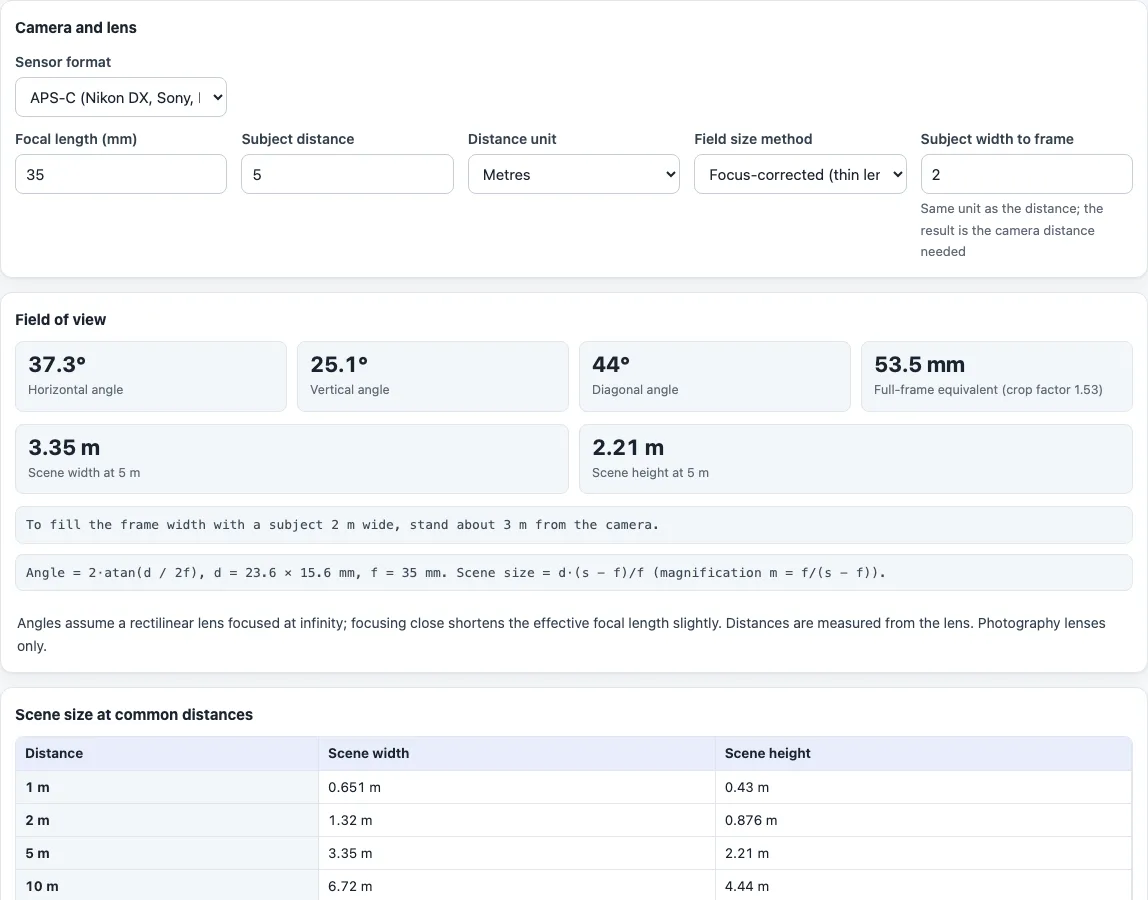
- Read the three angles under “Field of view”: “Horizontal angle”, “Vertical angle” and “Diagonal angle”, then the full-frame equivalent focal length. Below them are “Scene width at …” and “Scene height at …” for your distance, and a sentence such as “To fill the frame width with a subject 2 m wide, stand about 3.00 m from the camera.”
- The table “Scene size at common distances” lists width and height at 1, 2, 5, 10 and 20 m, or at 3, 6, 15, 30 and 60 ft when the unit is feet. “Print” prints the result and the table.
Example: APS-C (23.6 × 15.6 mm), 35 mm lens, subject 5 m away. The angles are 37.3° horizontal, 25.1° vertical and 44.0° diagonal, and the full-frame equivalent is 53.5 mm (crop factor 1.53). The scene is 3.35 m wide and 2.21 m high. To frame a 2 m wide subject you stand about 3.00 m away.
What is field of view?
Field of view is how much of the scene a lens and sensor record. It is measured either as an angle, called the angular field of view or angle of view, or as the width and height of the scene at a certain distance. The angle depends only on the lens and sensor. The scene size grows with distance.
How is the field of view calculated?
The angle is 2·atan(d / 2f), where f is the focal length and d is the sensor width, height or diagonal. For a 50 mm lens on a 36 × 24 mm sensor this gives 39.6° horizontal, 27.0° vertical and 46.8° diagonal. The result assumes a rectilinear lens focused at infinity.
What is the difference between the two field size methods?
The simple approximation gives scene width = d·s/f, where s is the subject distance. The focus-corrected method uses the thin-lens magnification m = f/(s − f) and gives d·(s − f)/f. For a 36 mm wide sensor, a 50 mm lens and a subject 2 m away, the first gives 1440 mm and the second 1404 mm. The difference is f/s of the width, so it shrinks quickly as you move away.
What is the full-frame equivalent focal length?
It is the focal length times the crop factor, and it tells you which lens on a 36 × 24 mm sensor would give the same angle. The tool computes the crop factor from your sensor, so a 35 mm lens on the 23.6 × 15.6 mm APS-C entry shows 53.5 mm. A “35mm” reference here means the 36 × 24 mm full-frame size.
Does focusing closer change the field of view?
Yes. Wikipedia’s article on angle of view notes that focusing close makes the effective focal length f(1 + m), so the angle gets narrower, about a third narrower at 1:2 magnification. The angles on this page are the infinity-focus values. Only the scene size uses the focus correction.
What does it not cover?
It does not model lens distortion, fisheye projection or zoom breathing, and distances are measured from the lens rather than the sensor. It is not meant for security cameras or telescopes.
Frequently asked questions
Is the field of view calculator free, and is anything uploaded?
It is free and needs no account. Everything runs in your browser, and nothing you type is uploaded.
What is the difference between a FOV calculator and an angle of view calculator?
The angle of view calculator also converts a wanted angle back into a focal length and lists common lenses. This page adds the scene size at a distance and the distance needed to frame a subject.
How do I find the camera distance for a subject of a given width?
Type the width into “Subject width to frame”. The sentence under the results gives the distance from the camera to the subject for that width to fill the frame.
Which field size method is selected by default?
“Focus-corrected (thin lens)”. Past a few metres the two methods agree closely, as the 1440 mm against 1404 mm example above shows at 2 m.
Can I use it for an astronomy or telescope field of view?
No. The astro field of view of a telescope with an eyepiece uses a different calculation, in the telescope field of view calculator.
Can I use a sensor that is not in the list?
Yes. Choose “Custom size (enter width × height)” and type its dimensions in millimetres.
Related tools
- Angle of view calculator converts a wanted angle into a focal length and lists common lenses.
- Crop factor calculator gives the crop factor and equivalents for a sensor.
- Depth of field calculator shows how much of the scene is sharp at your aperture and distance.
- Telescope field of view calculator gives the true field of view for a telescope and eyepiece.
- Sensor size comparison draws two sensors to scale with the area ratio and stops of light.