Golden Ratio Calculator
Enter one length to get its golden ratio partner, or enter your photo size to see the golden crop with a phi grid.
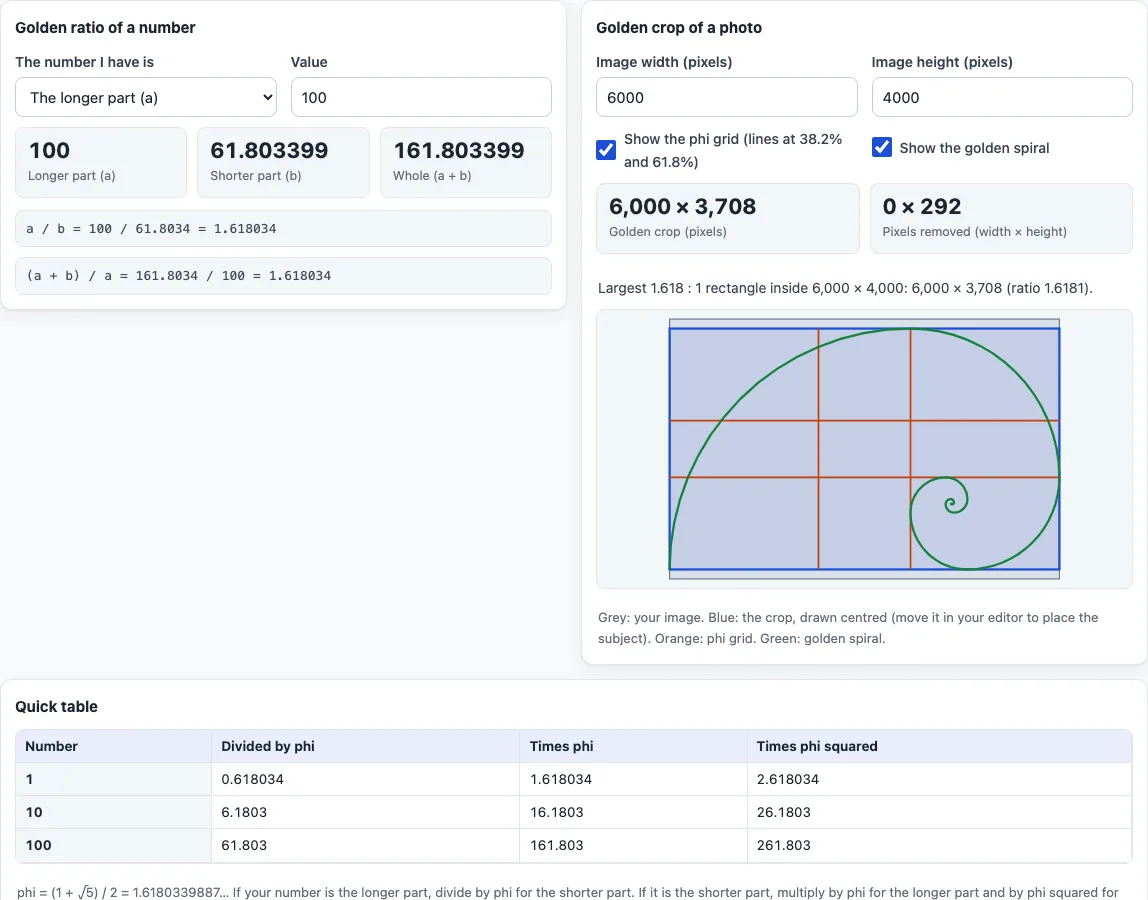
A golden ratio calculator splits a number into two parts whose ratio is 1.618, the golden ratio. Type the longer part, the shorter part or the whole length and it gives the other two to six decimal places, with the check that a ÷ b and (a + b) ÷ a both equal 1.618. It also has a photography tool: enter the pixel size of an image and it returns the largest golden rectangle that fits inside it, how many pixels the crop removes, and a drawing with the phi grid and golden spiral laid over the crop.
It runs in your browser, it is free, and nothing you type or open is uploaded. Use the first tool for design sizes, the second to crop a photo to 1.618 : 1. The golden ratio is a guide to proportion, not a rule that makes a picture good.
How to use the golden ratio calculator
Golden ratio of a number
- Under “The number I have is”, choose “The longer part (a)”, “The shorter part (b)” or “The whole length (a + b)”.
- Type the “Value”, for example 100.
- Read “Longer part (a)”, “Shorter part (b)” and “Whole (a + b)”. The two check lines under them show a ÷ b and (a + b) ÷ a.
Golden crop of a photo
- Type the “Image width (pixels)” and “Image height (pixels)”, for example 6000 and 4000.
- Read “Golden crop (pixels)” and “Pixels removed (width × height)”. The sentence under them states the ratio of the crop.
- Tick or clear “Show the phi grid (lines at 38.2% and 61.8%)” and “Show the golden spiral” to change the drawing. Grey is your image, blue the centred crop, orange the grid and green the spiral.
The table “Quick table” shows 1, 10 and 100 divided by phi, times phi and times phi squared. Example: a 100 cm longer part has a 61.8 cm shorter part and a 161.8 cm whole, and a 6000 × 4000 photo crops to 6000 × 3708. The page address keeps your numbers, so you can bookmark a setup or send it to a client. Results update as you type. If a field is empty or zero, the tool tells you what to enter instead of showing a result.
What is the golden ratio?
Two quantities a and b, with a larger than b, are in the golden ratio when (a + b) ÷ a equals a ÷ b. That common value is phi, (1 + √5) ÷ 2, or 1.6180339887 to ten places. A rectangle with sides in this ratio is a golden rectangle: cut off a square and what remains is a smaller golden rectangle. Quarter circles drawn in the successive squares approximate the golden spiral. These definitions come from the Wikipedia article on the golden ratio.
How do you calculate the golden ratio of a number?
If you know the longer part a, the shorter part is a ÷ 1.618 and the whole is a × 1.618. If you know the shorter part b, the longer is b × 1.618 and the whole is b × 1.618², or b × 2.618. If you know the whole, the longer part is the whole ÷ 1.618 and the shorter is the whole ÷ 2.618. For 100, the longer part gives 61.8034 and 161.8034; the whole gives 61.8034 and 38.1966, which add back to 100.
How do you crop a photo to the golden ratio?
The golden crop is the largest rectangle with long side to short side of 1.618 that fits inside your image, in the same orientation. A 3:2 photo of 6000 × 4000 pixels is narrower than 1.618, so the tool keeps the full width and cuts the height to 6000 ÷ 1.618 = 3,708 pixels, removing 292. A 16:9 frame of 1920 × 1080 is wider, so the height stays and the width becomes 1080 × 1.618 = 1,747. The crop is drawn centred; in your editor, slide it to place the subject.
What are the phi grid and the golden spiral?
The phi grid is a set of lines that divide the crop at 38.2% and 61.8% of each side, so the middle band is narrower than the outer ones. The spiral is built from quarter circles in the squares left when the golden rectangle is repeatedly cut. Both are guides some photographers use when placing a subject. The tool draws them from the ratio; it does not claim that following them makes a better picture.
Sources
- Wikipedia, Golden ratio (read 17 Oct 2026) — definition (a+b)/a = a/b = phi, phi = (1 + √5)/2 ≈ 1.6180339887, golden rectangle, spiral from quarter circles in squares. It does not mention photography or the phi grid.
- Splits, crop size and grid lines at 1/phi² and 1/phi are arithmetic on those definitions.
Frequently asked questions
What is the golden ratio number?
1.6180339887, written phi, equal to (1 + √5) ÷ 2. Each part of a golden split is 1.618 times the next smaller.
How do I find the golden ratio of a length?
Choose which part you know, type it as the “Value” and read the other two. For a 100 cm longer part, the shorter part is 61.8 cm and the whole is 161.8 cm.
How do I crop a photo to the golden ratio?
Enter the image width and height in pixels. The calculator returns the largest 1.618 : 1 crop, such as 6000 × 3708 from 6000 × 4000.
What is the golden ratio as a percentage?
The shorter part is about 38.2% of the whole and the longer part about 61.8%. These are the positions of the phi grid lines.
Is the golden ratio the same as the rule of thirds?
No. The rule of thirds places lines at 33.3% and 66.7%. The phi grid places them at 38.2% and 61.8%, so they sit slightly closer to the centre.
Does the crop have to be centred?
No. The drawing shows it centred, but the size is what matters: any 1.618 : 1 rectangle of that size inside your image is a golden crop, so slide the frame in your editor to put the subject where you want it.
Is my image uploaded anywhere?
No. You only type the image size, nothing is uploaded, and the calculator runs in your browser for free.
Related tools
- Aspect ratio calculator gives the missing width or height for any ratio.
- Image resizing calculator scales an image size and keeps the ratio.
- Aspect ratio converter converts a size from one ratio to another.
- Pixel aspect ratio calculator works with non-square pixels.
- Screen aspect ratio calculator finds the ratio of a screen from its resolution.
- 16:9 aspect ratio calculator gives the matching width or height for 16:9.