Hyperfocal Distance Calculator
Enter your sensor, focal length and aperture to get the hyperfocal distance and the nearest sharp point when you focus on it.
A hyperfocal distance calculator gives you the focus distance at which everything from half that distance to infinity is acceptably sharp. Enter a sensor, focal length and aperture, and this hyperfocal calculator returns the hyperfocal distance in metres and feet, the near limit when you focus at it, and a hyperfocal distance chart you can print.
It runs in your browser, it is free, and nothing you type is uploaded. The result is sometimes called the hyperfocal length, and photographers use it for landscape, architecture and street work where depth of field has to reach far. It works for any lens you can describe by focal length and aperture.
How to use the hyperfocal distance calculator
- Choose your camera under “Sensor format”, or pick “Custom size (enter width × height)” and type the sensor width and height in millimetres.
- Type the “Focal length (mm)”, for example 35.
- Type the “Aperture (f-number)”, for example 8.
- Leave “Circle of confusion (CoC)” on “Sensor diagonal ÷ 1500 (default)”, or choose “0.030 mm (classic full-frame value)” or “Enter my own” and type a value in µm. The default is the sensor diagonal divided by 1500, which is 0.0288 mm on full frame.
- Read “Hyperfocal distance (metres)” and “Hyperfocal distance (feet)”. “Near limit when focused at H” is the closest sharp distance when you focus at that distance, and “Far limit” is always infinity.
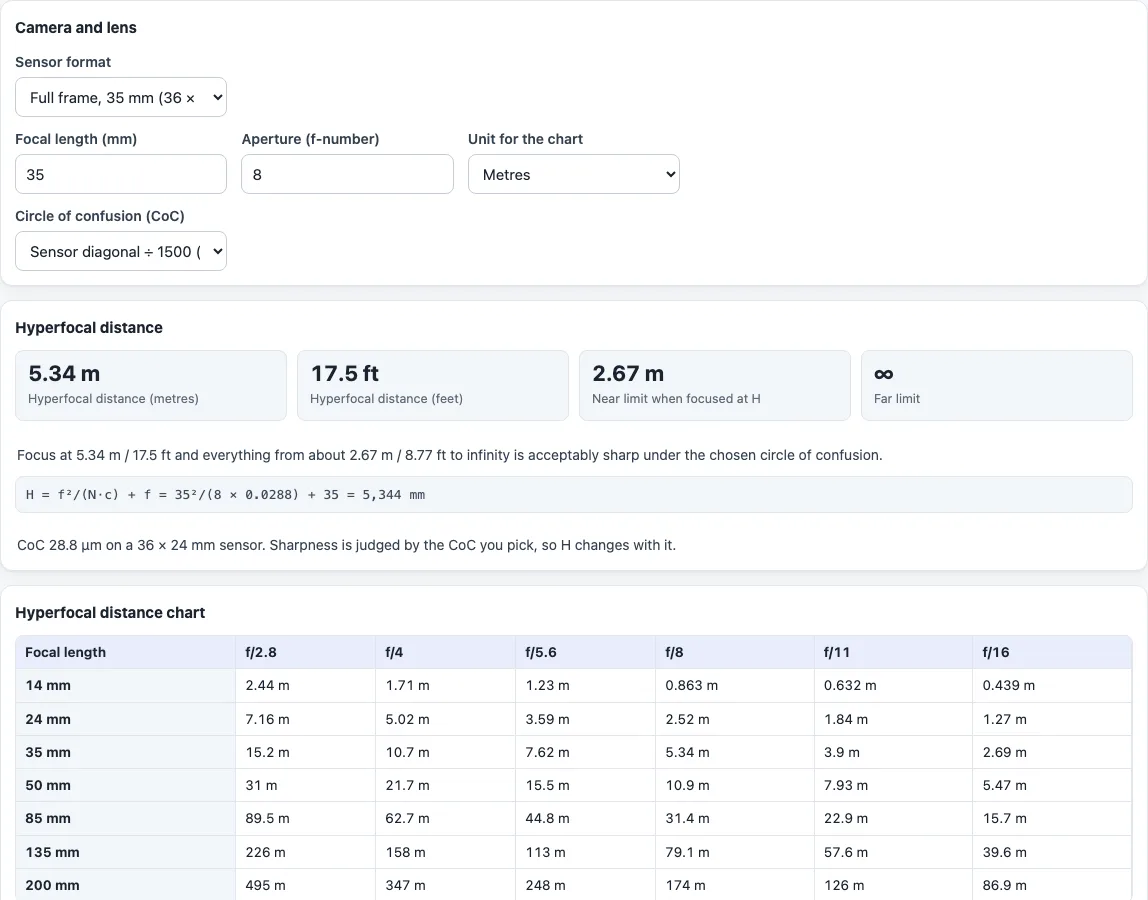
- Set “Unit for the chart” to “Metres” or “Feet” and read the “Hyperfocal distance chart”. Its rows are 14, 24, 35, 50, 85, 135 and 200 mm, plus the focal length you typed, and its columns are f/2.8, 4, 5.6, 8, 11 and 16. “Print” prints the result and the chart. To compare another aperture, change step 3 and read the result again: a larger f-number gives a shorter hyperfocal distance.
Example: full frame, 35 mm, f/8, default CoC (0.0288 mm). The hyperfocal distance is 5.34 m (17.5 ft), and focusing there gives sharpness from 2.67 m to infinity. With the “0.030 mm” CoC the same lens and aperture gives 5.14 m.
What is hyperfocal distance?
The hyperfocal distance is the closest focus distance at which the far limit of depth of field reaches infinity. Focus at that distance and the zone runs from half of it to infinity. Focus nearer and the far limit falls short of infinity. Focus farther and the near limit moves away.
What is the hyperfocal distance formula?
The calculator uses H = f²/(N·c) + f, where f is the focal length, N the f-number and c the circle of confusion, all in millimetres. The simpler form f²/(N·c) leaves out the final f. For 50 mm at f/8 with c = 0.03 mm the full formula gives 10,467 mm, and the simpler one about 10,417 mm, a difference of roughly 0.5 %. The tool shows the formula with your own numbers under the result.
What is the circle of confusion and why does it matter?
The circle of confusion is the largest blur spot that still counts as a sharp point. The hyperfocal distance depends on it, so a smaller CoC gives a larger hyperfocal distance. The default, the sensor diagonal divided by 1500, is a common convention and equals 0.029 mm on full frame. It is a convention, not a measured limit, so the page lets you change it.
How do I read a hyperfocal distance chart?
Find your focal length in the left column and your aperture in the top row. The value where they meet is the hyperfocal distance for the CoC shown under the chart. Longer lenses and wider apertures push the numbers up. At 14 mm and f/8 the full-frame value is 0.86 m, and at 200 mm and f/16 it is 86.9 m.
Does sensor size change the hyperfocal distance?
Yes, through the CoC. With the default CoC a smaller sensor has a smaller CoC, so the hyperfocal distance grows. The same 35 mm lens at f/8 gives 5.34 m on full frame and 8.15 m on APS-C (23.6 × 15.6 mm), because the APS-C CoC is 0.0189 mm.
How reliable is “focus at H”?
It is a convention-dependent shortcut. Objects at infinity are only as sharp as the CoC allows, so a stricter CoC gives a larger H. The calculator does not apply diffraction limits or take print size into account.
Frequently asked questions
Is the hyperfocal distance calculator free, and is anything uploaded?
It is free and needs no account. Everything runs in your browser, and nothing you type is uploaded.
What is the difference between a hyperfocal calculator and a depth of field calculator?
A hyperfocal calculator answers one question, where to focus so the far limit is infinity. The depth of field calculator takes any subject distance and returns near, far and total depth of field.
Is hyperfocal length the same as hyperfocal distance?
People use the two terms for the same focus distance, and this tool reports it as “Hyperfocal distance”.
Why is the near limit exactly half of H?
With this formula, focusing at H puts the near limit at H/2.
Why does another calculator or app give a different hyperfocal distance?
The usual causes are a different circle of confusion and whether the final “+ f” is included. Compare the CoC first, since the tool shows the one it used under the result.
Can I print the chart?
Yes. Use the “Print” button. It prints the result and the hyperfocal distance chart, not the page around them.
Can I choose feet or metres?
The result shows both. “Unit for the chart” switches the chart and the near limit between “Metres” and “Feet”.
Related tools
- Depth of field calculator gives near, far and total depth of field for any subject distance.
- Crop factor calculator shows the crop factor behind each sensor format.
- Field of view calculator gives the angle and scene size for a lens and sensor.
- Angle of view calculator converts between focal length and angle of view.