Model Release Form
Fill in the model, the photographer and how the images may be used, then print the release or download it.
A model release form is a signed document in which a model gives a photographer written permission to use photos of them. This model release form is a free fill-in template: you enter the model, the photographer, the shoot and the permitted uses, and the release text updates as you type.
People search for the same document as a model release document, a model waiver form, a model image release form, a release form for photographers or a model release form template. When the wording looks right, print it, download it as .txt or .html, or copy the text. It runs in your browser, uploads nothing and needs no sign-up.
This is a starting template, not legal advice. Laws differ by place, so have a qualified professional review it before you use it. Adult content has extra legal requirements that this template does not cover.
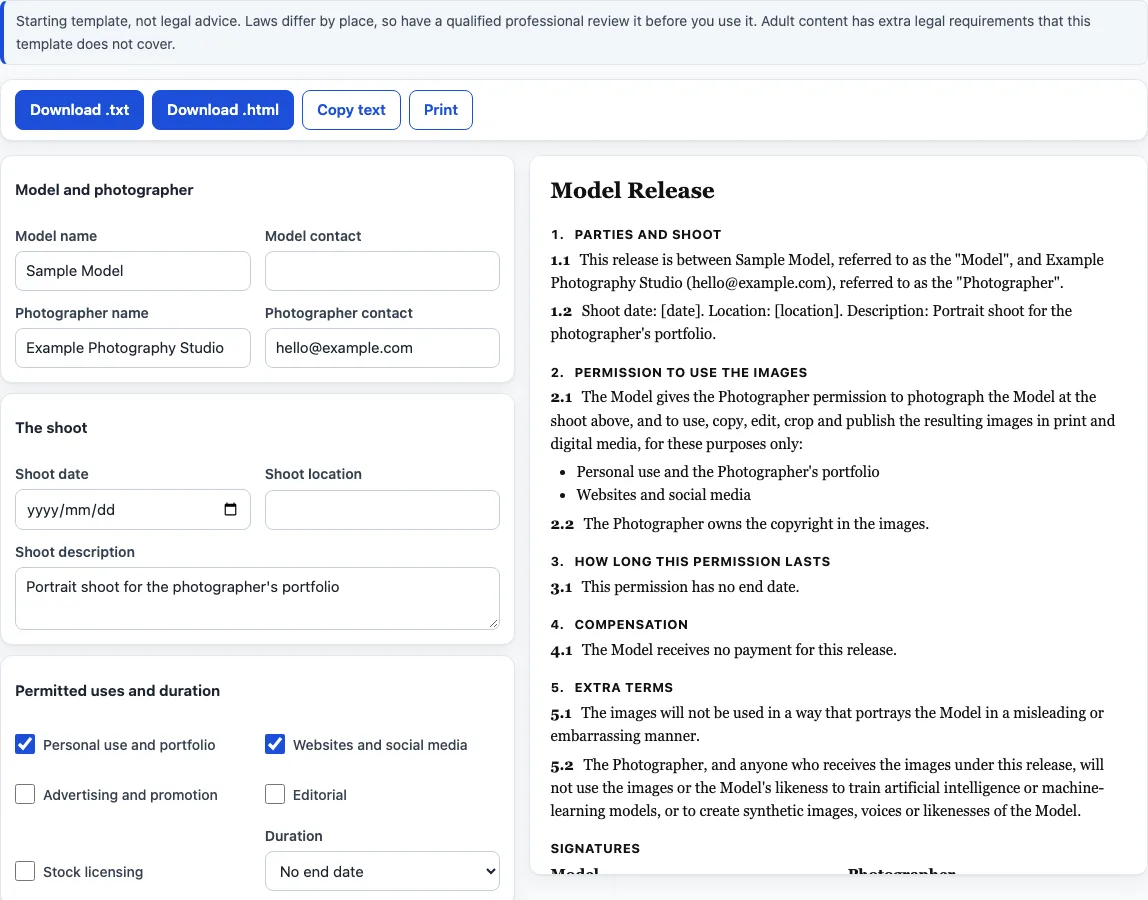
How to use the model release form
- Under “Model and photographer”, enter “Model name”, “Model contact”, “Photographer name” and “Photographer contact”.
- Under “The shoot”, enter “Shoot date”, “Shoot location” and “Shoot description”.
- Under “Permitted uses and duration”, tick the uses you want named: “Personal use and portfolio”, “Websites and social media”, “Advertising and promotion”, “Editorial” or “Stock licensing”. The first two start ticked.
- Still in that section, choose “Duration”: “No end date” or “A number of years”. The second option shows a “Years” box.
- Under “Compensation”, choose “None”, “A fee”, “Copies of images” or “Other”. A fee adds “Fee amount” and “Currency symbol”; “Other” adds “Other compensation”.
- Under “Extra terms and signatures”, tick any of “Model may review images before first use”, “No misleading or embarrassing use” and “No use for AI training”. The last two start ticked.
- Tick “Model is a minor (adds a parent or guardian signature block)” if it applies, and type the “Parent or guardian name”.
- Tick “Add a witness signature line” if you want one.
- Read the preview. Anything left blank shows a placeholder in square brackets instead of an error.
- Click “Download .txt”, “Download .html”, “Copy text” or “Print”. For a model release form PDF, click “Print” and choose to save as PDF in your browser’s print dialog; the tool itself downloads .txt and .html.
What does a model release cover?
The release is numbered in this order: Parties and shoot; Permission to use the images; How long this permission lasts; Compensation; Extra terms; and Model under the age of majority. Extra terms appears only when one of its boxes is ticked, and the minor section only when the minor box is ticked, so the numbers close up when a part is left out. Signature blocks come last: Model, Parent or legal guardian of the Model (only for a minor), Photographer and an optional Witness, each with Name, Signature and Date lines.
The permission clause says the model allows the photographer to photograph them at the shoot and to use, copy, edit, crop and publish the images in print and digital media for the listed purposes only. It then lists exactly the uses you ticked. If none is ticked, the text says that no purpose has been selected yet. A separate sentence states that the photographer owns the copyright in the images.
How long does a model release last?
“No end date” produces the sentence “This permission has no end date.” “A number of years” produces a sentence that the permission lasts the number of years you type from the shoot date, and that after that no new uses may start. The count runs from the date in “Shoot date”, so a blank date leaves a [date] placeholder in the shoot clause.
What changes when the model is a minor?
Ticking the minor box adds a section headed “Model under the age of majority”. It states that the signer is the parent or legal guardian, confirms they are entitled to sign for the model and agrees to the release on the model’s behalf. A signature block for the parent or legal guardian is added between the model’s and the photographer’s. The tool does not say what age counts as a minor in any place.
What can the extra terms add?
“Model may review images before first use” adds a sentence that the model can review the chosen images before first publication and that an image they object to will not be used. “No misleading or embarrassing use” adds a sentence that images will not portray the model in a misleading or embarrassing way. “No use for AI training” adds a sentence that neither the photographer nor anyone who receives the images under the release will use the images or the model’s likeness to train AI or machine-learning models, or to create synthetic images, voices or likenesses of the model.
Frequently asked questions
Is this model release form free, and is anything uploaded?
It is free, needs no sign-up and runs entirely in your browser. What you type is never uploaded.
Can I use the releases I make here for client work or commercially?
Yes. The documents you make here are free to use for client work and anything else, with no attribution. The only limit is copying this site to run a competing tool.
Does it cover adult content?
No. Adult content has extra legal requirements that this template does not cover, and the template contains no wording for it.
Is this legal advice?
No. It is a starting template, not legal advice. Laws differ by place, so have a qualified professional review it before you use it.
Can I get a PDF?
Yes, through your browser: click “Print” and choose to save as PDF in the print dialog. The tool downloads .txt and .html files.
What do I need to enter?
The model, the photographer, the shoot and the permitted uses. The release text updates as you type.
Why does the form open with example names?
So you can see a finished release first. Replace the example names and details with your own before you print or send it.
How do I get the text out of the page?
Print it, download it as .txt or .html, or copy the text and paste it into your own document.
Related tools
- Photography contract template: a fill-in agreement for the paid job itself, with fee, delivery and usage rights.
- Wedding photography contract template: a separate clause set for weddings.
- Photography invoice template: turns line items, discount, tax rate and deposit into a printable invoice.
- Photography pricing calculator: works out an hourly rate and job price from your own numbers.
- Photography shot list: a printable checklist of shots for the shoot.
- Photo backdrop size chart: backdrop sizes for studio set-ups.