Photography Shot List
Pick a type of shoot to start from a ready list of shots, then add, edit and reorder them and print the checklist.
This photography shot list builder starts from a ready checklist for the kind of shoot you pick, then lets you edit it, reorder it and print it. There are ten shoot types: wedding, engagement or couple, family portrait, newborn, graduation or senior, corporate headshots or team, birthday or kids party, real estate listing, product or e-commerce, and event or conference.
Each one opens as a photo shoot shot list split into groups. The wedding list, for example, has getting ready, ceremony, family formals, couple portraits and reception. Untick the shots you do not want, rewrite any line, add your own shots and mark priorities, then print the checklist or download it as .txt or .csv. The tool is free, runs in your browser, uploads nothing and needs no sign-up.
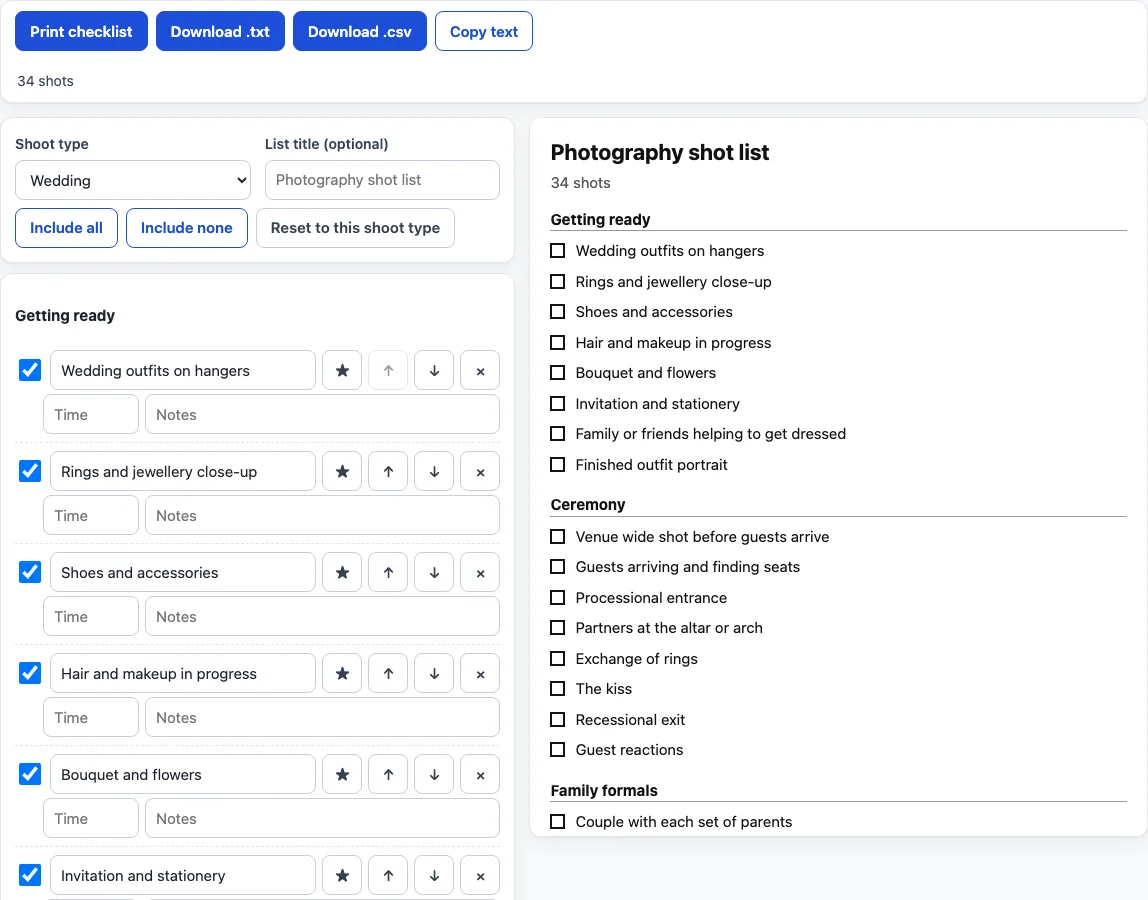
How to use the photography shot list
- Choose a “Shoot type”. The wedding list loads first.
- Type a “List title (optional)” if you want a heading on the printout. Without one the title is “Photography shot list”.
- Read the grouped list. Each shot has an “Include this shot” checkbox and editable “Shot description”, “Time” and “Notes” boxes.
- Untick the shots you do not need. “Include all” ticks every shot, “Include none” unticks them all, and “Reset to this shoot type” restores the original list, so you can start again after experimenting.
- Press the ★ button (“Priority shot”) on any must-have shot you want marked. The star carries through to the printout and the downloads.
- Use “Move up” and “Move down” to reorder a shot inside its group, and “Remove this shot” to delete it.
- Under “Add your own shot”, type the “New shot”, pick its “Group” and click “Add shot”. Enter also adds it.
- Check the preview and the count line, such as “34 shots”. Only included shots with some text appear in the preview, the printout and the downloads.
- Click “Print checklist”, “Download .txt”, “Download .csv” or “Copy text”. The print view puts an empty square before each shot, so you can tick shots off on paper, and the .csv opens in a spreadsheet with the columns Group, Shot, Priority, Time, Notes and Done.
What is a photography shot list?
A photography shot list is a written list of the pictures planned for a shoot, grouped in the order you expect to take them, with a square to tick when each one is taken. A photo shot list like this one is a checklist rather than a schedule: the time and notes boxes are optional, and every shot can be ticked on or off.
What is in each ready list?
The number of shots in the ready lists, before you change anything, is:
- Wedding: 34 shots (getting ready 8, ceremony 8, family formals 5, couple portraits 5, reception 8)
- Engagement or couple: 15
- Family portrait: 13
- Newborn: 15
- Graduation or senior: 15
- Corporate headshots or team: 12
- Birthday or kids party: 14
- Real estate listing: 17
- Product or e-commerce: 14
- Event or conference: 17
Family portrait, engagement or couple, graduation or senior and corporate headshots are the lists to start from for a portrait photography shot list. Every shot is a generic subject, such as “Front-facing headshot” or “Top-down flat lay”, with no names, brands or camera settings, so the lists read as a photography shot list example you can adapt.
How is a shot list saved?
Your edits are not stored, so print, download or copy the list before you leave the page. The chosen shoot type stays in the page address as ?s= followed by its name, and the wedding list, which is the default, adds nothing to the address.
What do the printout and the downloads contain?
The print view shows an empty square before each shot, the ★ for priority shots, any time and any notes. The .txt file starts with the title and the count, then lists each group with lines in the form “[ ] * 10:30 shot text – notes”, where * marks a priority shot and the time and notes appear only when you typed them. The .csv has the columns Group, Shot, Priority, Time, Notes and Done, with “Yes” in Priority for starred shots and Done left empty. Text cells that start with =, +, - or @ get a leading apostrophe so a spreadsheet does not run them as formulas.
Frequently asked questions
Is this photography shot list free, and is anything uploaded?
It is free, needs no sign-up and runs entirely in your browser. What you type is never uploaded.
Can I use the lists I make here for client work or commercially?
Yes. The lists you make here are free to use for client work and anything else, with no attribution. The only limit is copying this site to run a competing tool.
Is there a food photography or brand photoshoot shot list?
Not as a ready list. The closest is “Product or e-commerce”, which you can edit and extend with your own shots under “Add your own shot”.
Can I move a shot to a different group?
“Move up” and “Move down” work inside one group. To put a shot in another group, remove it and add it again with that group chosen in “Group”.
Does it suggest camera settings or know my client’s schedule?
No. It does not suggest camera settings and does not know your client’s family, venue or schedule, so the list only holds the shots and notes you keep or write.
Will my list still be there if I come back?
No. Edits are not saved between visits. Use “Download .txt”, “Download .csv” or “Copy text” to keep a copy.
Related tools
- Photography contract template: a fill-in agreement with fee, deposit, delivery and usage rights.
- Wedding photography contract template: a separate clause set for weddings.
- Photography invoice template: turns line items, discount, tax rate and deposit into a printable invoice.
- Model release form: a fill-in release for a person who appears in the photos.
- Photography pricing calculator: works out an hourly rate and job price from your own numbers.
- Photo backdrop size chart: backdrop sizes for studio set-ups.