Photography Contract Template
Fill in the form and the contract updates as you type. Choose the type of shoot, the deposit and the usage rights, then print or download it.
This photography contract template turns the details you type into a numbered, plain-text photography contract that updates as you type. It covers portrait, family or newborn, event, commercial or brand, and headshot shoots, so it works as a basic photography contract, a photography agreement template or an event photography agreement.
Fill in the parties, session, fee, deposit, delivery and usage rights, then print it, download .txt or .html, or copy the text. The form opens with example values (Example Photography Studio and Sample Client), so the preview doubles as a sample photography contract. It is free, runs in your browser, uploads nothing and needs no sign-up.
This is a starting template, not legal advice. Laws differ by place, so have a qualified professional review it before you use it.
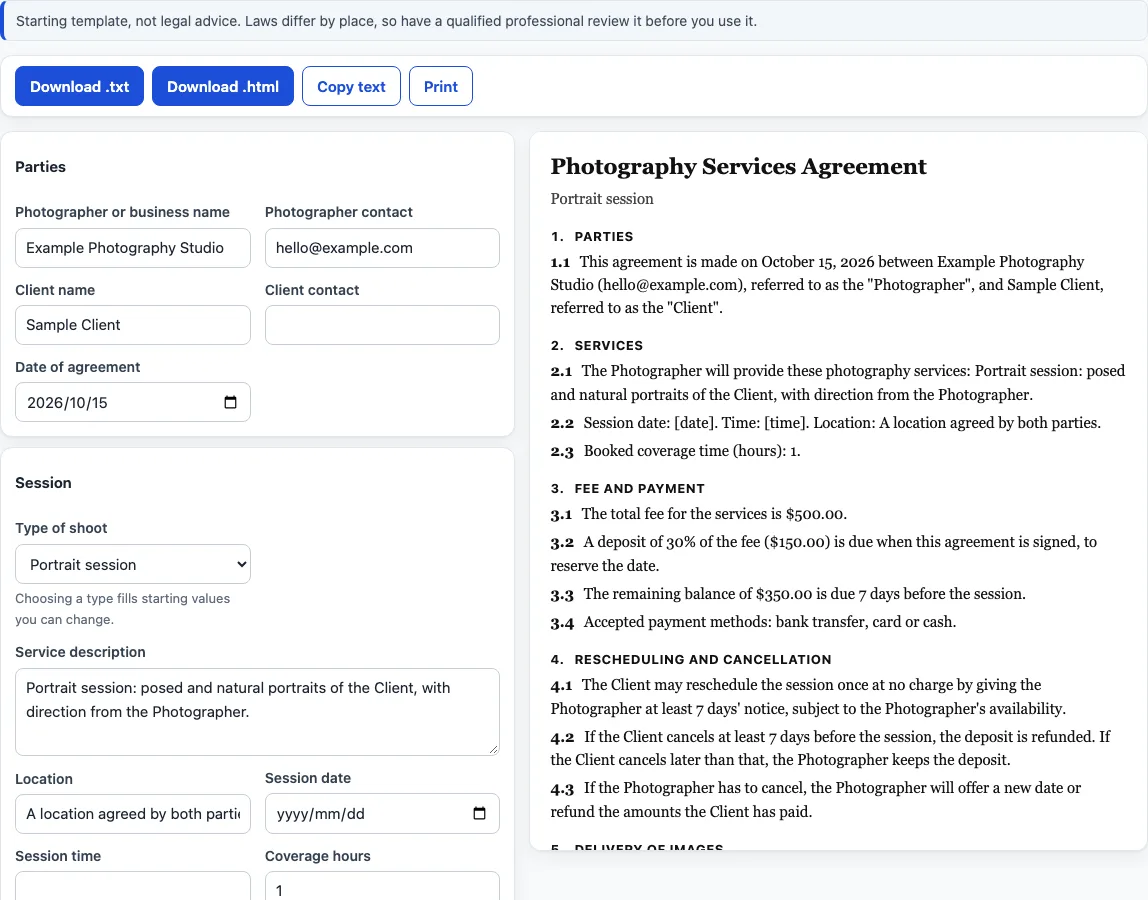
How to use the photography contract template
The first three sections start open and the other four collapsed; click a heading to open it.
- Under “Parties”, fill in “Photographer or business name”, “Photographer contact”, “Client name”, “Client contact” and “Date of agreement” (it starts as today’s date).
- Under “Session”, pick the “Type of shoot”. A type fills starting values you can change for the service text, location, coverage hours, number of images, days to deliver and usage rights.
- Edit “Service description”, “Location”, “Session date”, “Session time” and “Coverage hours”.
- Under “Fee and payment”, enter “Total fee” and “Currency symbol”, choose a “Deposit” and its “Deposit value”, set “Balance due, days before the session” (0 means the day of the session) and list the “Payment methods”.
- Under “Rescheduling and cancellation”, choose “Rescheduling”, “Cancellation by the client” and “Notice, in days”.
- Under “Delivery”, set “Number of edited images”, “Days to deliver” and “Delivery format”.
- Under “Rights, liability and general terms”, choose “Usage rights”, then “Limit of liability”, “Governing law (place)” and the portfolio, outside-control and whole-agreement switches.
- Under “Optional clauses”, tick any you want. “Backup of files” and “Extra editing charged separately” start ticked.
- Look through the preview for text in square brackets: a blank or unusable field shows a placeholder such as [client name] instead of an error.
- Click “Download .txt”, “Download .html”, “Copy text” or “Print”.
What does the photography contract template put in the agreement?
The agreement is numbered in this order: Parties; Services; Fee and payment; Rescheduling and cancellation; Delivery of images; Copyright and use of images; Additional terms; Limit of liability; Events outside our control; and General terms. The middle three appear only when you switch something on, and the numbers close up around any clause that is left out. Signature blocks for the Photographer and the Client, each with Name, Signature and Date lines, come last.
General terms always holds the governing-law sentence and adds the whole-agreement sentence when that box is ticked. The result is a contract agreement for photography services between a “Photographer” and a “Client”.
What is the difference between the three usage rights options?
Copyright and use of images always states that the Photographer owns the copyright in the session images, then adds the usage sentence and a portfolio sentence.
- Personal-use licence for the client: the client may print, share and display the delivered images for personal, non-commercial purposes, including personal social media, and may not sell them or use them for advertising or business without written permission.
- Commercial licence for listed uses: the client may use the images for the business purposes you type in “Permitted business uses”; any other use needs written permission.
- Photographer keeps all rights: the client may view the images to choose from them, and any other use needs written permission.
How are the deposit and balance worked out?
With “Percent of the fee”, deposit = round(fee x percent / 100), rounding halves away from zero to the nearest cent. The balance is the fee minus the deposit, and it never shows below zero. With “Fixed amount” the deposit is the number you type, and with “No deposit” the clause reads “The full fee” instead of a balance.
For example, a fee of 500.00 at 30 % gives a deposit of 150.00 and a balance of 350.00. A fee of 1,234.56 at 12.5 % gives a deposit of 154.32 and a balance of 1,080.24. This is arithmetic on the numbers you enter.
Can I use it as an event photography contract?
Yes. Pick “Event” under “Type of shoot” and the service text becomes event coverage at “The event venue”. “Overtime rate”, “Travel fee” and “Guests, children and pets” are optional clauses. Weddings have their own page and clause set.
What choices does each section offer?
- Type of shoot: “Portrait session”, “Family or newborn”, “Event”, “Commercial or brand” or “Headshots”.
- Deposit: “Percent of the fee”, “Fixed amount” or “No deposit”.
- Rescheduling: “One free reschedule with notice”, “New date by availability, deposit carries over” or “One reschedule, then a new deposit”.
- Cancellation by the client: “Deposit is not refunded”, “Deposit refunded with enough notice” or “Full fee owed with short notice”.
- Delivery format: “Private online gallery”, “Download links” or “USB drive”.
- Limit of liability: “No clause”, “Limited to fees paid” or “Replacement session or refund”.
- Optional clauses: “Backup of files”, “Extra editing charged separately”, “Weather change of date”, “Late arrival”, “Guests, children and pets”, “Professional and backup equipment”, “Overtime rate” (adds “Overtime rate per hour”) and “Travel fee” (adds “Travel fee amount”).
The three usage rights options are described above.
Frequently asked questions
Is this photography contract template free, and is anything uploaded?
It is free, needs no sign-up and runs entirely in your browser. What you type is never uploaded, and the details are not put in the page address.
Can I use the contracts I make here for client work or commercially?
Yes. The documents you make here are free to use for client work and anything else, with no attribution. The only limit is copying this site to run a competing tool.
Is this legal advice?
No. It is a starting template, not legal advice, and this page says nothing about how any document would be treated in any place. Laws differ by place, so have a qualified professional review it before you use it.
What happens if I leave a field blank?
The contract shows a [placeholder] at that spot instead of an error. Fill every bracket before you download, copy or print.
Can I get a Word file or a PDF?
The tool downloads .txt and .html, and “Copy text” lets you paste into any word processor. For a PDF, click “Print” and save as PDF in your browser’s print dialog. There is no .docx download.
Does it include a model release or wedding terms?
No. Each has its own page.
Where can I see photography contract examples?
The form itself is one. It opens filled in with example values (Example Photography Studio and Sample Client), so the preview shows what photography contract examples look like before you type anything. Replace the example text with your own details; it is a starting template, not legal advice.
Related tools
- Wedding photography contract template: a separate clause set for weddings, with timeline, formals, second photographer and retainer.
- Photography invoice template: turns line items, discount, tax rate and deposit into a printable invoice.
- Model release form: a fill-in release for a person who appears in the photos.
- Photography pricing calculator: works out an hourly rate and job price from your own numbers.
- Photography shot list: a printable checklist of shots for the session.
- Photo backdrop size chart: backdrop sizes for studio and event set-ups.