Photography Invoice Template
Add your details and the items for the shoot. The invoice totals itself, and you can print it or download it.
This photography invoice template builds a printable invoice from your business and client details, line items, an optional discount, a tax rate you type and a deposit already paid, and it totals everything to the cent as you type. It works as a photography bill template, a photoshoot invoice template or a photographer invoice template.
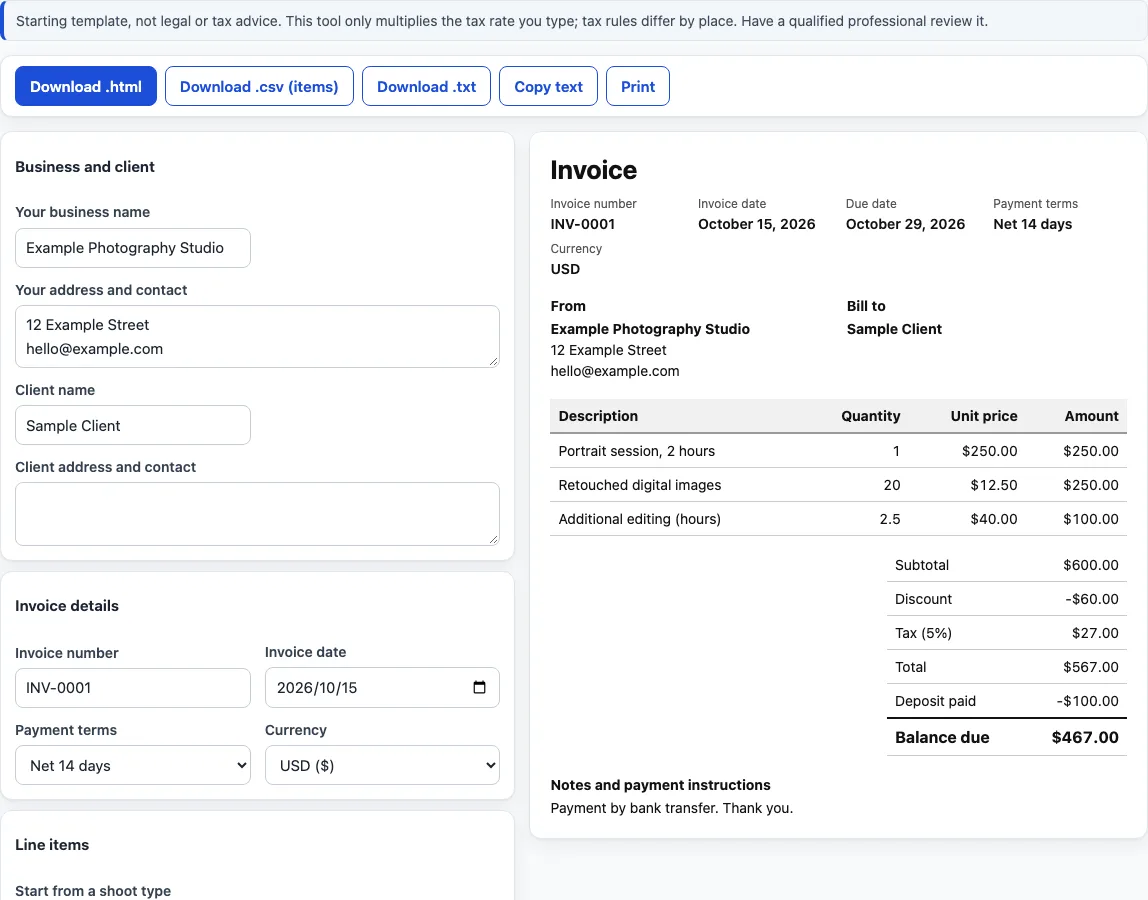
The page opens with a filled-in photography invoice example (a portrait session, retouched digital images and extra editing), so it also serves as a photography invoice sample you can read before you replace it with your own items. It is free, runs in your browser, uploads nothing and needs no sign-up.
This is a starting template, not legal or tax advice. It only multiplies the tax rate you type; tax rules differ by place.
How to use the photography invoice template
- Under “Business and client”, enter “Your business name”, “Your address and contact”, “Client name” and “Client address and contact”.
- Under “Invoice details”, set “Invoice number” (it starts as INV-0001), “Invoice date” (today) and “Payment terms”. For the net options the due date is the invoice date plus that many days, and “Choose a due date” shows a “Due date” box.
- Choose the “Currency”, or “Custom symbol” for your own (up to 6 characters, shown before amounts).
- Under “Line items”, fill in each row’s Description, Quantity and Unit price; the Amount is worked out for you. Click “Add row” for more rows, or the × button to remove one.
- To begin from a list of item names, use “Start from a shoot type” and pick one. It replaces the current rows with item names and blank prices.
- Under “Discount, tax and deposit”, choose the “Discount” type, then type the “Discount value”, the “Tax rate, %” and any “Deposit already paid”.
- Under “Notes and payment instructions”, type any “Notes”.
- Read the preview. A row with nothing in it is skipped, a blank quantity counts as 1 and a blank price as 0.
- Click “Download .html”, “Download .csv (items)”, “Download .txt”, “Copy text” or “Print”. Printing from the browser prints only the invoice.
How is the total on a photography invoice calculated?
Each line amount is unit price x quantity, rounded to whole cents with halves rounded away from zero. The subtotal is the sum of the line amounts. The discount, either a percent of the subtotal or a fixed amount, comes off the subtotal. Tax is worked out on the discounted amount, not on the original subtotal, and the total is the discounted amount plus tax.
The example invoice has three lines: 1 x 250.00, 20 x 12.50 (250.00) and 2.5 x 40 (100.00). The subtotal is 600.00. A 10 % discount is 60.00, leaving 540.00. Tax at 5 % is 27.00, so the total is 567.00. Rounding happens per figure: 2.5 x 33.33 = 83.325 becomes 83.33, 15 % of 33.33 = 4.9995 becomes 5.00, and 8.25 % tax on 10.01 = 0.825825 becomes 0.83.
What does the balance due mean?
Balance due = total - deposit already paid. In the example, a 100.00 deposit leaves a balance due of 467.00. If the deposit is larger than the total, the last line reads “Overpaid (credit)” and shows the positive amount instead.
What does the invoice layout include?
The invoice is headed “Invoice” with the number, date, due date, payment terms and currency. “From” and “Bill to” blocks follow, then the table with Description, Quantity, Unit price and Amount, then the totals: Subtotal, Discount, Tax with its rate, Total, Deposit paid and Balance due. The Discount, Tax and Deposit paid rows appear only when they are not zero. The “Notes and payment instructions” block comes last when you typed a note.
What options does the form offer?
“Payment terms” are “Due on receipt”, “Net 7 days”, “Net 14 days”, “Net 30 days” or “Choose a due date”. “Currency” is “USD ($)”, “EUR (€)”, “GBP (£)”, “CAD (CA$)”, “AUD (A$)”, “INR (₹)” or “Custom symbol”. “Start from a shoot type” offers “Portrait session”, “Wedding”, “Event”, “Commercial or brand”, “Headshots” and “Real estate”. “Discount” is “No discount”, “Percent of subtotal” or “Fixed amount”. The .html download is a self-contained file.
When does the invoice show a message?
If something cannot be calculated, one message names the problem and no totals show until it is fixed. The messages cover a quantity or unit price that is not a number (with the row number), a discount percent outside 0 to 100, a fixed discount larger than the subtotal, a tax rate outside 0 to 100 and a negative deposit.
Frequently asked questions
Is this photography invoice template free, and is anything uploaded?
It is free, needs no sign-up and runs entirely in your browser. What you type is never uploaded, and the details are not stored or put in the page address, so download or copy the invoice before you close the page.
Can I use the invoices I make here for client work or commercially?
Yes. The documents you make here are free to use for client work and anything else, with no attribution. The only limit is copying this site to run a competing tool.
Does it add tax for my area?
No. It only multiplies the tax rate you type and knows no tax rules for any place. Leave “Tax rate, %” at 0 for no tax line.
Is this legal or tax advice?
No. It is a starting template and arithmetic on your own numbers, not legal or tax advice. Tax rules differ by place, so have a qualified professional review it.
Is there a Word version of the photography invoice template?
There is no .docx download. The tool gives you .html, .csv (items) and .txt files, and “Copy text” copies the invoice so you can paste it into any word processor.
What is the photography invoice format?
The invoice is headed “Invoice” with the number and dates, then “From” and “Bill to” blocks, a table of Description, Quantity, Unit price and Amount, the totals and your notes. The same layout works as a photography bill format, or a bill format for photography work, for any shoot.
What is in the CSV file?
One row per line item with Description, Quantity, Unit price and Amount, the money as plain decimals with no currency symbol. A text cell that starts with =, +, - or @ gets a leading apostrophe so a spreadsheet does not run it as a formula.
Related tools
- Photography contract template: a fill-in agreement with fee, deposit, delivery and usage rights.
- Wedding photography contract template: a separate clause set for weddings.
- Photography pricing calculator: works out an hourly rate and job price from your own numbers.
- Model release form: a fill-in release for a person who appears in the photos.
- Photography shot list: a printable checklist of shots for the session.
- Photo backdrop size chart: backdrop sizes for studio and event set-ups.