Photography Pricing Calculator
Enter your costs, the income you want and the hours you can bill to get an hourly rate, then price a single job from its hours and expenses.
This photography pricing calculator turns your own costs, the income you want and your working hours into a billable hourly rate, then prices one job from its hours and expenses. It works as a photography cost calculator for portrait, wedding, commercial, real estate and headshot jobs alike, because it uses only the numbers you type and holds no rates of its own for any kind of shoot.
Step 1 gives the hourly rate and the business cost per billable hour. Step 2 gives a minimum price, a suggested price and an effective rate per hour for a single job, and each result is shown with its formula and your numbers. The tool is free, runs in your browser, uploads nothing and needs no sign-up.
Everything it shows is arithmetic on your own numbers, not business, legal or tax advice. It makes no claim about what other photographers charge.
How to use the photography pricing calculator
- Type your “Currency symbol” (up to 6 characters) at the top.
- In “Step 1: your billable hourly rate”, optionally fill the boxes from “Fill with example numbers”: “Part-time photographer (example numbers)”, “Full-time photographer (example numbers)” or “Hobbyist going pro (example numbers)”. Changing any box resets the choice.
- Enter the six monthly costs: gear and repairs, insurance, software and subscriptions, marketing, studio or space, and other business costs.
- Enter “Income you want per year, before tax”. It is a plain number and no tax is calculated.
- Enter “Hours worked per week”, “Weeks worked per year” and “Share of time that is billable, %”.
- Read “Billable hourly rate”, “Business cost per billable hour”, “Billable hours per year” and “Annual business costs”, with the formula lines under them.
- In “Step 2: the price of one job”, enter “Shooting hours”, “Editing hours”, “Admin hours” and “Travel hours”.
- Keep “Use the hourly rate from step 1” ticked, or untick it and type an “Hourly rate to use”.
- Enter the direct costs (“Prints”, “Album”, “Assistant”, “Travel costs”, “Venue or studio hire”, “Second shooter”, “Other direct costs”) and “Profit added on top, %”.
- Read “Minimum price”, “Suggested price”, “Effective rate per hour” and “Total hours”. “Copy result” copies the headline results of both steps as text.
How is a photography hourly rate calculated?
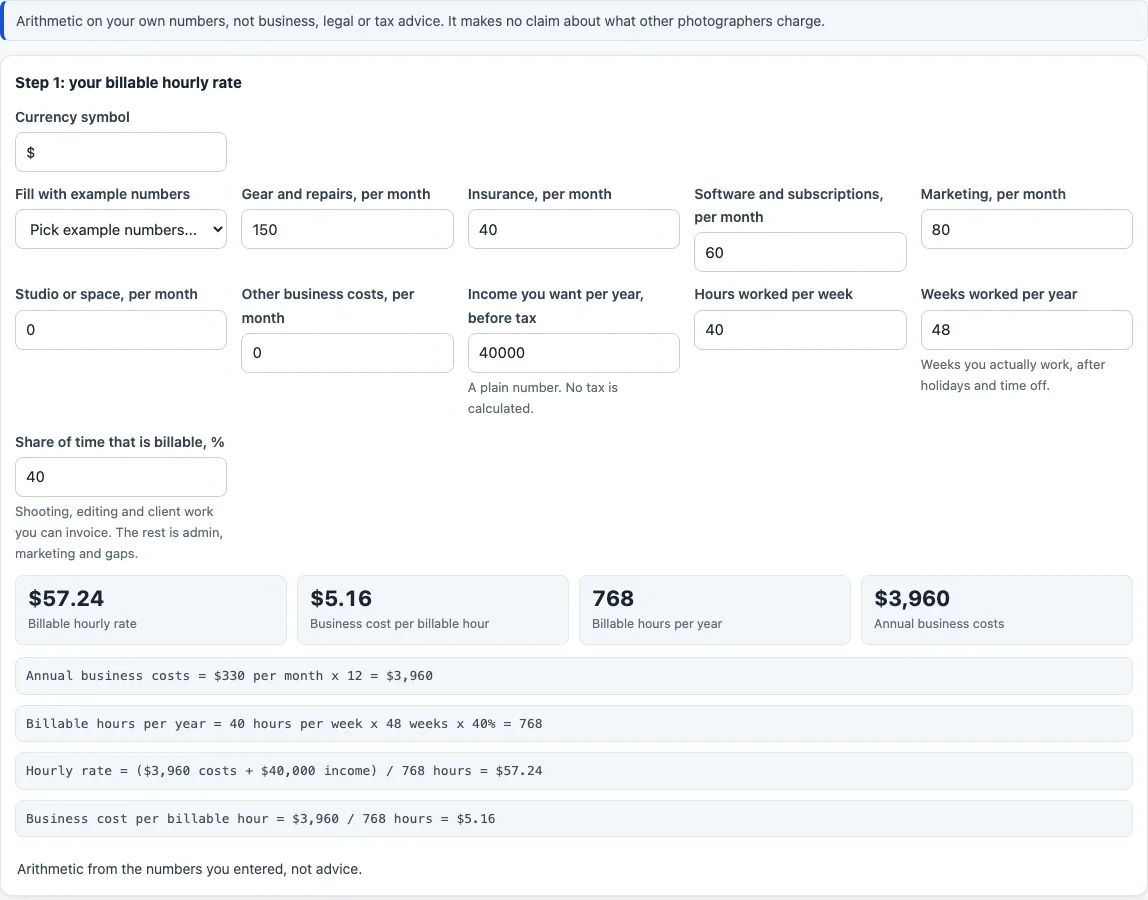
Annual business costs = 12 x the monthly costs added together. Billable hours per year = hours per week x weeks per year x billable share / 100. Billable hourly rate = (annual business costs + income you want) / billable hours per year. Business cost per billable hour = annual business costs / billable hours per year.
For the part-time example numbers: monthly costs of 150 + 40 + 60 + 80 = 330 give 3,960 a year. Adding 40,000 income gives 43,960. At 40 hours a week for 48 weeks with 40 % billable, there are 768 billable hours, so the rate is 43,960 / 768 = 57.24 and the cost per billable hour is 3,960 / 768 = 5.16. The full-time and hobbyist example sets give 118.31 and 39.29. They are only example numbers, not figures for any real business.
How is the price of one job worked out?
Total hours = shooting + editing + admin + travel. Time cost = total hours x the hourly rate. Direct costs = prints + album + assistant + travel costs + venue + second shooter + other. Minimum price = time cost + direct costs. Suggested price = minimum price x (1 + profit % / 100). Effective rate per hour = (suggested price - direct costs) / total hours.
Example: 2 shooting + 3 editing + 1 admin + 0 travel = 6 hours at a rate of 50 gives a time cost of 300. Prints of 40 and other direct costs of 10 make 50 of direct costs, so the minimum price is 350. A profit of 20 % gives a suggested price of 420, and the effective rate is (420 - 50) / 6 = 61.67 per hour.
What does the profit percentage do?
It is a markup on the minimum price, which already includes time and direct costs. It is not a share of the final price: in the example, the 70 added to 350 is 20 % of 350 but 16.67 % of the 420 suggested price. “Suggested price” is simply the minimum plus the percentage you typed, not a recommendation.
What do the working-hours boxes mean?
“Weeks worked per year” is counted after holidays and time off, and “Share of time that is billable, %” is the shooting, editing and client work you can invoice. The page opens with the part-time example set. The settings you enter are kept in the page address, so a link reproduces your settings; nothing is sent anywhere.
When does the calculator show a message?
A message appears if a box is not a plain number of 0 or more, if hours per week are outside 0 to 168, if weeks are outside 0 to 52, if the billable share is outside 0 to 100, if hours, weeks and share give no billable hours, or if the job has no hours.
Frequently asked questions
Is the photography pricing calculator free, and is anything uploaded?
It is free, needs no sign-up and runs entirely in your browser. What you type is never uploaded; the settings sit in the page address only so a link can reproduce them.
Does it tell me what to charge?
No. It adds up your costs, your wanted income and your hours, and it says nothing about what other photographers charge. The “Suggested price” is the minimum plus your own profit percentage.
Can I use it for wedding, portrait, commercial, real estate or headshot pricing?
Yes, because the fields are the same for any job: you enter your own hours and costs. There are no separate rates for a wedding photography pricing calculator or a real estate one, and no preset by type of shoot.
Is there an Excel version?
No. There is no spreadsheet download. Each formula is shown on the page with your numbers, and “Copy result” copies the headline figures as text.
What does it leave out?
It does not suggest a price level, compare with the market, calculate tax or payment-service fees, account for seasonality or save anything between visits.
Are my numbers saved?
The settings are kept in the page address, so a link reproduces them. Nothing is sent anywhere, and there is no account or stored history.
Related tools
- Photography invoice template: turns line items, discount, tax rate and deposit into a printable invoice.
- Photography contract template: a fill-in agreement with fee, deposit, delivery and usage rights.
- Wedding photography contract template: a separate clause set for weddings.
- Model release form: a fill-in release for a person who appears in the photos.
- Photography shot list: a printable checklist of shots for the session.
- Photo backdrop size chart: backdrop sizes for studio set-ups.