Screen Aspect Ratio Calculator
Get a monitor or display's aspect ratio from its resolution, its width and height from the diagonal, or its pixel density.
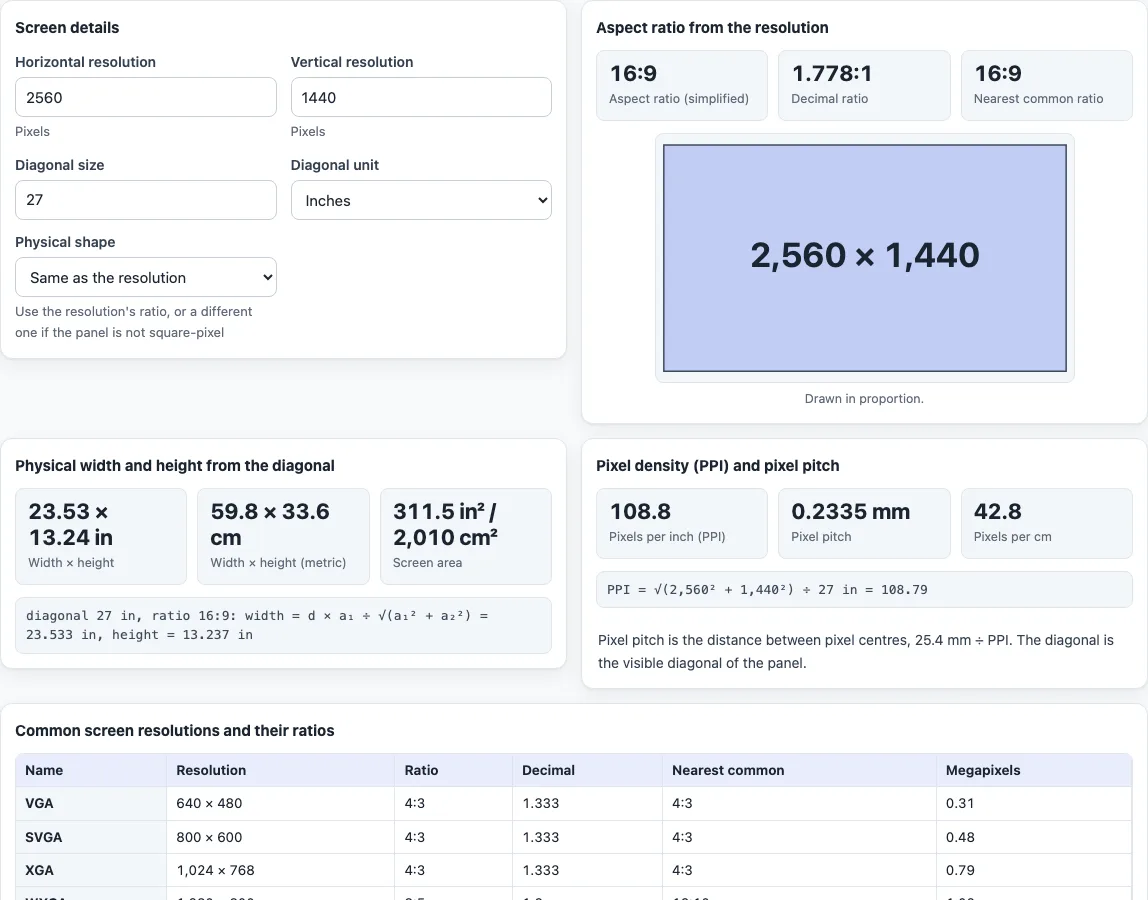
This screen aspect ratio calculator turns a resolution such as 2560 × 1440 into an aspect ratio (16:9), and, once you add a diagonal, into the physical width, height and area of the screen. It also gives pixels per inch (PPI) and pixel pitch.
It works as a display aspect ratio calculator and monitor ratio calculator: the “Nearest common ratio” shows the familiar name for the shape, and a table lists 17 standard resolutions with their ratios. It runs in your browser, it is free, and nothing you type is uploaded. Bezels, curved screens and viewing distance are not part of the calculation. Enter a resolution alone for the ratio, or add a diagonal for the physical size and the pixel density; the same page covers searches such as calculate screen ratio and monitor ratio calculator.
How to use the screen aspect ratio calculator
- Under “Screen details”, enter “Horizontal resolution” and “Vertical resolution” in pixels, for example 1920 and 1080.
- Under “Aspect ratio from the resolution”, read “Aspect ratio (simplified)”, “Decimal ratio” and “Nearest common ratio”. For 3440 × 1440 the decimal is 2.389:1 and the nearest common ratio is 2.39:1, off by 0.05 %.
- To get the physical size, enter the “Diagonal size” and choose the “Diagonal unit”: “Inches” or “Centimetres”. Use the visible diagonal of the panel. A diagonal in centimetres is converted to inches first (1 in = 25.4 mm), and the results appear in both units.
- Under “Physical width and height from the diagonal”, read “Width × height” in inches, “Width × height (metric)” and “Screen area”.
- Under “Pixel density (PPI) and pixel pitch”, read “Pixels per inch (PPI)”, “Pixel pitch” and “Pixels per cm”.
- If the physical shape differs from the resolution’s shape, set “Physical shape” to “Custom ratio” and enter it in “Physical ratio”. Only the physical size changes: PPI still uses the resolution and the diagonal.
- Use the “Common screen resolutions and their ratios” table to look up a name such as FHD or UWQHD. Its columns are the name, the resolution, the simplified ratio, the decimal, the nearest common ratio and the megapixels.
- Change any number and every section updates at once, including the to-scale drawing of the screen.
What is a screen aspect ratio?
It is the proportion between a display’s width and height, written width:height. A 1920 × 1080 monitor and a 2560 × 1440 monitor both have a 16:9 shape. The ratio describes the shape, and the resolution counts the pixels that fill it.
How do you calculate a screen ratio from a resolution?
Divide both numbers by their greatest common divisor (GCD). For 2560 × 1440 the GCD is 160, which gives 16:9. For 1280 × 800 it is also 160, giving 8:5, the same shape as 16:10. For 2560 × 1080 the GCD is 40, giving 64:27.
How is the nearest common ratio found?
Some resolutions do not reduce to a familiar ratio. 3440 × 1440 reduces to 43:18 (2.389), and 2560 × 1080 to 64:27 (2.370). The tool compares the shape with a list of common ratios and names the closest one if it is within 1 %: 2.39:1 for both of these, off by 0.05 % and 0.82 %. That 1 % rule is the tool’s own, not an industry standard.
How do you work out width and height from a diagonal?
For a diagonal d and a ratio a:b:
- Width = d × a ÷ √(a² + b²)
- Height = d × b ÷ √(a² + b²)
- Area = width × height
For a 27 in 16:9 screen, √(16² + 9²) = √337, about 18.36. That gives a width of 23.53 in and a height of 13.24 in. Inches and centimetres use 1 in = 25.4 mm, and the area is also shown in cm² (1 in² = 6.4516 cm²).
For the default 2560 × 1440 at 27 in, the page shows 23.53 × 13.24 in, 59.8 × 33.6 cm, and a screen area of 311.5 in² or 2,010 cm². If you set “Physical shape” to “Custom ratio” and enter 16:10 for the same 27 in diagonal, the physical size becomes 22.90 × 14.31 in, and the page notes that it is using the custom ratio.
How is PPI calculated?
PPI is the length of the diagonal in pixels divided by the diagonal in inches: √(W² + H²) ÷ d. A 2560 × 1440 screen at 27 in has 108.8 PPI, which is also 42.8 pixels per cm. The result assumes the diagonal is the visible panel diagonal and the pixels are square.
What is pixel pitch?
Pixel pitch is the distance between pixel centres, 25.4 mm ÷ PPI. A 1920 × 1080 screen at 24 in has 91.79 PPI, a pixel pitch of 0.2767 mm.
Frequently asked questions
Is the screen aspect ratio calculator free, and is anything uploaded?
It is free, runs in your browser and needs no sign-up. Nothing you type is uploaded.
How do I find a monitor’s aspect ratio?
Enter its horizontal and vertical resolution. For 3840 × 2160 the answer is 16:9.
How do I calculate a screen’s width and height from its diagonal?
Enter the resolution and the “Diagonal size”. The tool uses the ratio of the resolution, or a “Custom ratio” if you set one, to split the diagonal into width and height.
What is the difference between PPI and pixel pitch?
PPI is how many pixels fit in one inch along the diagonal. Pixel pitch is the distance between pixel centres in millimetres, 25.4 ÷ PPI.
What do names like FHD, QHD and UWQHD mean?
They are resolution names from the Wikipedia list of graphics display resolutions: FHD is 1920 × 1080, QHD is 2560 × 1440, UWQHD is 3440 × 1440 and 4K UHD is 3840 × 2160. The table on this page gives the name and size for 17 of them, and the ratio columns are calculated by the tool.
Why does 2560 × 1080 show a nearest ratio of 2.39:1 when it simplifies to 64:27?
The exact ratio is 64:27, or 2.370. The nearest common ratio is only a label for the shape, and it is 0.82 % away, inside the 1 % limit.
Does it include the bezel?
No. Enter the visible diagonal of the panel. Bezels, curved screens and viewing distance are ignored.
Can I use it for LED screens or ultrawide displays?
Yes, for any resolution and diagonal: 2560 × 1080 gives 64:27 and 3440 × 1440 gives 43:18. The physical size assumes the diagonal you enter is the visible one.
Related tools
- Aspect ratio calculator: Find the ratio of any width and height, or a missing side.
- 16:9 aspect ratio calculator: Get exact 16:9 sizes in pixels.
- Aspect ratio converter: Convert a size to another ratio by cropping, padding or stretching.
- Image resizing calculator: Scale a picture while keeping its proportions.
- Pixel aspect ratio calculator: Check the shape of individual pixels in video frames.