Shutter Speed Chart
Every full-stop shutter speed with its exact time and what it is usually used for, and a calculator for the slowest handheld speed.
A shutter speed chart lists the exposure times a camera can use, from 30 seconds down to 1/8000 second, with what each speed is usually used for. This one shows every full stop with its exact time and its “Stops from 1 s”, adds a 1/3-stop scale, and has a calculator for the slowest handheld speed from your focal length, crop factor and image stabilisation. Use it to find a speed for a subject, or to see what the numbers on a camera dial really mean.
It is a camera shutter speed chart for any camera: it lists the standard series, not the settings of one brand or model. It runs in your browser, it is free, nothing you type is uploaded, and you can print it from the browser.
How to use the shutter speed chart
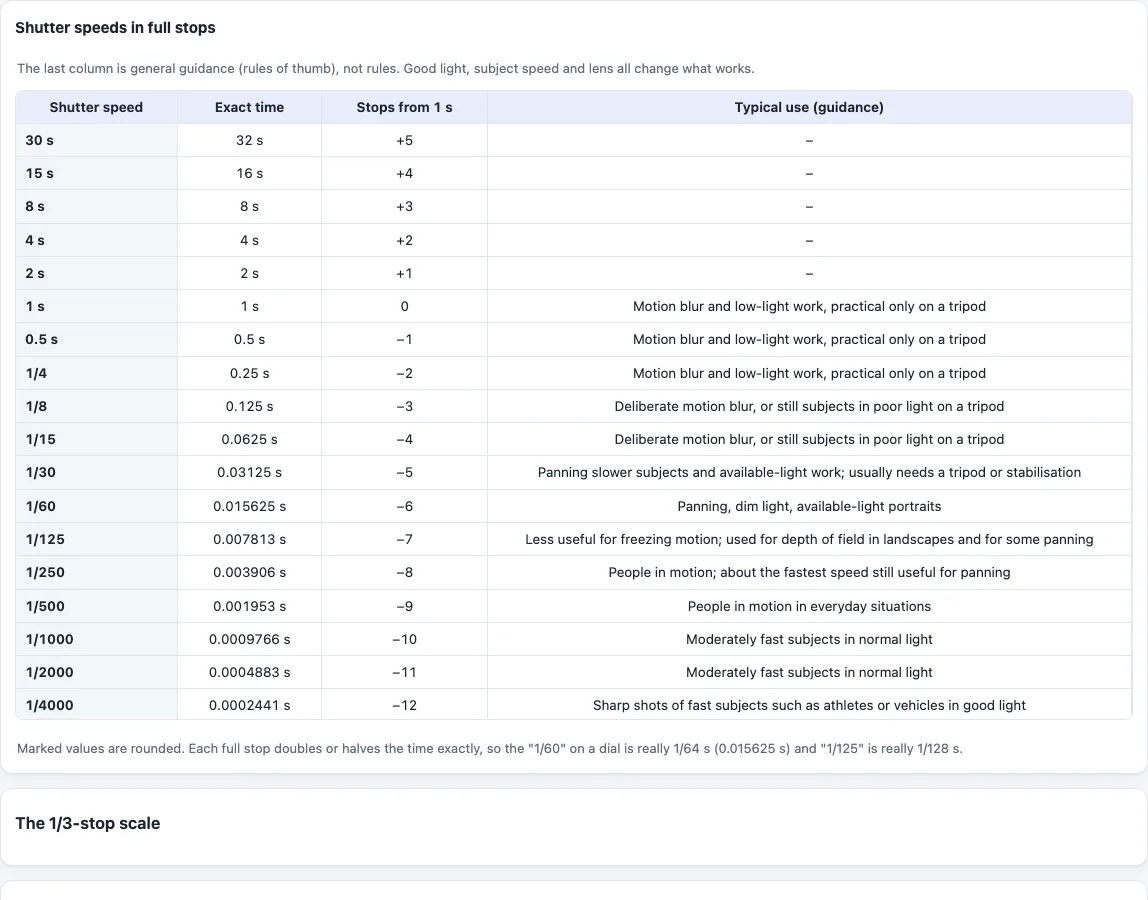
- Read the table “Shutter speeds in full stops”, which runs from 30 s down to 1/8000 s. Each row is one stop, so every row has twice or half the light of its neighbour.
- Compare “Shutter speed” (the value on a camera dial) with “Exact time” in the same row, and read “Typical use (guidance)” for what the speed suits. The use notes are rules of thumb, not rules. Rows from 2 s to 30 s have no use note.
- For finer steps, open “The 1/3-stop scale”. Many cameras step in thirds of a stop.
- For a handheld limit, go to “Handheld shutter speed: the reciprocal rule”. Enter the “Focal length (mm)”.
- On a crop-sensor camera, enter the “Crop factor”. 1 means full frame, and the focal length is multiplied by this number.
- If your lens or body has image stabilisation, enter “Image stabilisation (stops)” using the figure it states. Leave 0 if there is none.
- Read “Nearest marked time (1/3-stop)”, “Nearest full-stop time” and “Exact value of the rule”. The line under them shows the working. Treat the result as a starting point, not a guarantee of a sharp shot.
- To keep a copy, use your browser’s print command. The print view holds the full-stop table, the 1/3-stop scale and the handheld result.
What does a shutter speed chart show?
It shows how long the shutter stays open at each setting. Each full stop doubles or halves the time, and so doubles or halves the light reaching the sensor. A slower shutter records more light and gives more chance of motion blur.
Why is 1/60 really 1/64 on a shutter speed chart?
The full-stop series is exact powers of 2: 2^e seconds, from 32 s down to 1/8192 s. The numbers on a dial are rounded labels. So “1/60” is 2^-6 = 0.015625 s (1/64 s) and “1/125” is 1/128 s, which is 0.0078 s. In the same way 30, 15, 8 and 4 s stand for 32, 16, 8 and 4 s. This is simple maths and a dial convention, not a rule from a standards document.
What are the 1/3-stop shutter speeds?
The 1/3-stop scale uses 2^(e/3) seconds, which gives 55 rows from 30 s to 1/8000 s. The marked values on it, such as 1/8000, 1/6400, 1/5000 and 1/4000, are again rounded dial values.
What shutter speed for different subjects?
As guidance only: 1/8000 and 1/4000 for very fast subjects such as birds, planes, athletes or vehicles in good light, 1/2000 and 1/1000 for moderately fast subjects in normal light, and 1/500 and 1/250 for people in motion. 1/250 is about the fastest speed still useful for panning. 1/125 is less useful for freezing motion. 1/60 suits panning, dim light and available-light portraits. From 1/15 down to 1 s the chart lists deliberate motion blur and low-light work on a tripod. Good light, subject speed and the lens all change what works.
What is the slowest handheld shutter speed?
The rule of thumb is that the slowest speed without much camera shake is about 1 / (focal length × crop factor). With 50 mm and crop factor 1 the exact value is 1/50 s: the nearest full-stop time is 1/60 and the nearest 1/3-stop time is 1/50.
With a 200 mm lens and crop factor 1.5 the effective focal length is 300 mm and the base time is 1/300 s. Three stops of stabilisation multiply the time by 2^3, giving 1/37.5 s. The tool shows 1/38 as the exact value, 1/40 as the nearest 1/3-stop time and 1/30 as the nearest full-stop time.
The crop factor step is the usual extension of the rule, not part of it. Wikipedia’s Shutter speed article says stabilisation may allow speeds 3 to 4 stops slower than this guide, but the tool uses only the number of stops you type. The rule ignores sensor resolution, your technique and how much the subject moves, so treat it as a starting point.
Frequently asked questions
Is the shutter speed chart free?
Yes. It is free, needs no account and runs in your browser. Nothing you type is uploaded.
Can I print the shutter speed chart?
Yes. Use your browser’s print command. The print view holds the full-stop table, the 1/3-stop scale and the handheld result.
Is this a shutter speed cheat sheet for any camera?
Yes. It lists the standard series of times and is not specific to one brand such as Canon. The values your camera offers depend on the model.
Does it show aperture and ISO together?
No. This chart covers shutter times only. For aperture, ISO and shutter speed in one grid, use the aperture, shutter speed and ISO chart linked below.
Is the handheld speed a guarantee of a sharp shot?
No. It is a rule of thumb. Sensor resolution, technique and subject movement all matter.
What is the fastest shutter speed on the chart?
The chart ends at 1/8000 s, the fastest time it lists, and starts at 30 s. The 1/3-stop scale covers the same range in 55 rows. What your own camera offers depends on the model.
Why does the chart show no guidance from 2 s to 30 s?
The guidance column only covers speeds that come with a use note. Speeds from 2 s to 30 s are shown with the exact time and stops only.
Related tools
- Aperture, shutter speed and ISO chart: the shutter time for each aperture and ISO at a chosen scene brightness.
- Exposure calculator: keep the same exposure while changing aperture, shutter time, ISO or an ND filter.
- Exposure value calculator: turn settings into an EV and compare two exposures in stops.
- Sunny 16 rule calculator: the daylight starting exposure from the Sunny 16 rule.
- Depth of field calculator: how the aperture changes the zone that looks sharp.
- Time lapse calculator plans photos, clip length and card space for a time lapse.