Sunny 16 Rule Calculator
Pick an ISO and the sky conditions to get the aperture and shutter speed the rule gives, and the equal exposures around it.
A Sunny 16 rule calculator gives the aperture and shutter speed for daylight without a meter. Set your ISO and the sky, and this one returns the aperture from the rule’s table, the shutter time of 1 divided by the ISO, and the EV100 of those settings. The rule is f/16 at a shutter time of 1/ISO for a subject in direct sunlight, and each darker sky opens the aperture by one stop, down to f/4 for open shade or sunset.
It also lists every equal aperture and shutter pair, and works out the aperture for a shutter time you want. It is free, runs in your browser, and nothing you type is uploaded.
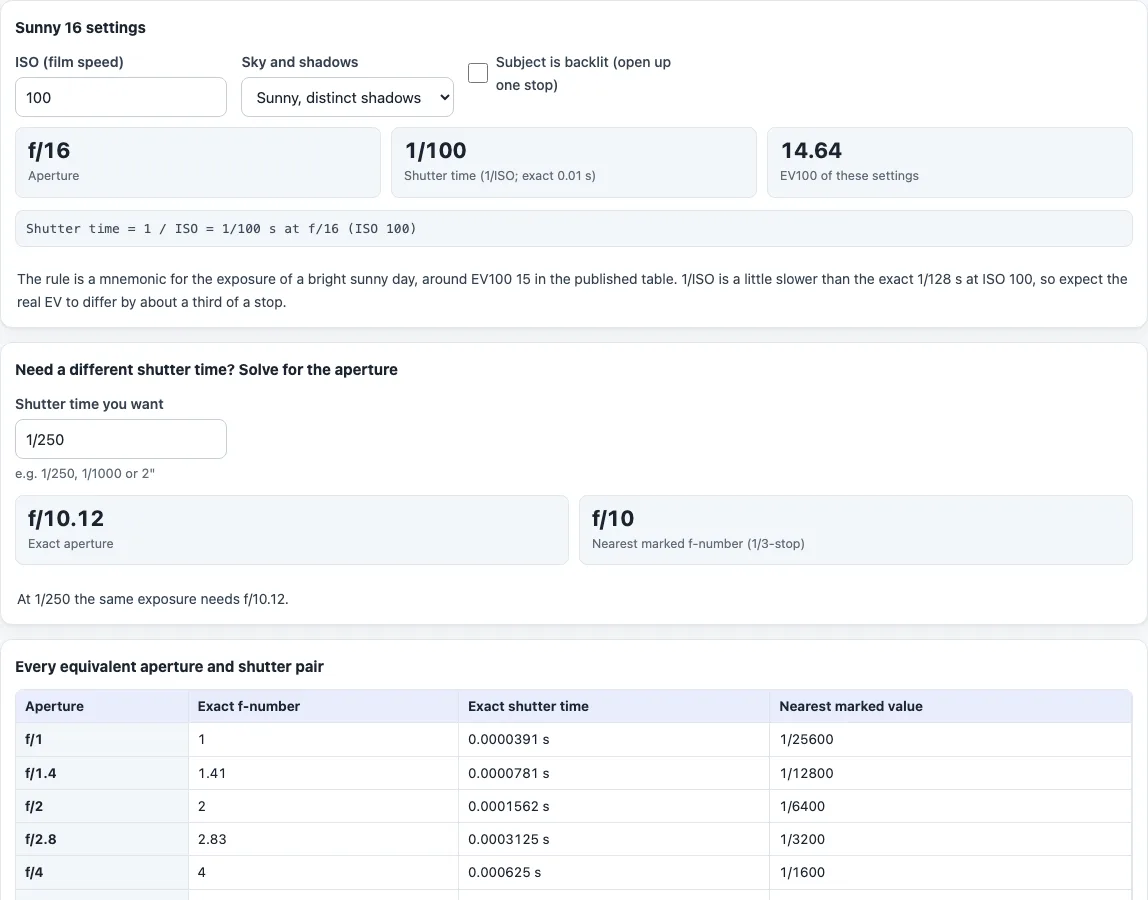
How to use the Sunny 16 rule calculator
- Under “Sunny 16 settings” type the “ISO (film speed)”. The number is used as you type it, so it does not have to be a marked camera value.
- Choose the “Sky and shadows”: snow or sand, sunny with distinct shadows, slight overcast, overcast, heavy overcast, or open shade or sunset.
- Tick “Subject is backlit (open up one stop)” if it applies. The aperture opens by one stop, so f/16 becomes f/11.
- Read “Aperture”, “Shutter time (1/ISO; exact …)” and “EV100 of these settings”. The line under them shows the working. For ISO 100 and sunny the result is f/16, 1/100 and EV100 14.64.
- To use a different shutter time, type it under “Shutter time you want”, for example 1/250, 1/1000 or 2". The tool gives the “Exact aperture” and the “Nearest marked f-number (1/3-stop)” that keep the same exposure.
- The table “Every equivalent aperture and shutter pair” lists f/1 to f/32 with the shutter each needs. The row of the rule’s own aperture is highlighted.
- Open “The rule table by sky condition” to see the full rule. Settings with the same EV give the same exposure, so for ISO 100 and sunny, f/8 at 1/400 and f/16 at 1/100 are both EV100 14.64.
- Check the result against the sky you see: the rule is a rule of thumb, not a meter.
What is the Sunny 16 rule?
On a sunny day, set the aperture to f/16 and the shutter speed to the reciprocal of the ISO film speed, for a subject in direct sunlight. At ISO 100 that is f/16 at 1/100 s, or 1/125 s on a dial that has no 1/100. It is a mnemonic for the exposure of a bright day, not a metering method.
What aperture does the Sunny 16 rule give in other light?
Each darker condition opens the aperture by one stop:
- Snow or sand, dark shadows with sharp edges: f/22
- Sunny, distinct shadows: f/16
- Slight overcast, soft shadow edges: f/11
- Overcast, barely visible shadows: f/8
- Heavy overcast, no shadows: f/5.6
- Open shade or sunset, no shadows: f/4
For a backlit subject, add one stop. The shutter stays at 1/ISO throughout: ISO 200 gives 1/200 and ISO 400 gives 1/400, or the nearest dial values 1/250 and 1/500.
Why does the calculator show EV100 14.64 and not 15?
EV100 is the exposure value of the settings at ISO 100. The Wikipedia table lists EV100 15 for a typical scene in full or slightly hazy sunlight. The exact time for EV100 15 at f/16 is 1/128 s, and the rule uses 1/100, which is a little slower. The settings come out about a third of a stop from EV100 15, at 14.64.
Settings with the same EV give the same exposure. For example f/8 at 1/400 s and f/16 at 1/100 s are both EV 14.64. f/11 at 1/250 s and f/16 at 1/125 s agree to within about a tenth of a stop.
How do you find the aperture for another shutter speed?
The tool keeps the exposure of the rule’s settings. For a time t and the rule’s EV, the aperture is N = √(t × 2^EV). With the defaults, ISO 100 and sunny, a wanted time of 1/250 s gives f/10.12, and the nearest marked f-number is f/10. The “Exact aperture” can differ from the label on a lens, which is why the marked value is shown as well.
When is the Sunny 16 rule not enough?
It is a rule of thumb based on incident light. It is not a meter, it has no colour or time-of-day correction, and its table stops at open shade or sunset. The published table gives f/22 for snow or sand. For changing light, a generalised exposure table, such as the scene EV100 list in the exposure value calculator, is the better guide.
Frequently asked questions
Is the Sunny 16 rule calculator free?
Yes. It is free, needs no account and runs in your browser. Nothing you type is uploaded.
What f-stop does the Sunny 16 rule use?
f/16 for a subject in direct sunlight with distinct shadows. Other skies change the aperture, from f/22 for snow or sand to f/4 for open shade or sunset.
Why does the shutter time show 1/100 at ISO 100?
The rule sets the time to 1/ISO, which is exactly 1/100 at ISO 100. A camera that has no 1/100 would use the nearest value, 1/125.
How do I handle a backlit subject?
Tick “Subject is backlit (open up one stop)”. The aperture opens one stop, for example from f/16 to f/11.
Does the Sunny 16 rule work in all light?
No. It is a shortcut for daylight, and its table ends at open shade or sunset. It does not cover dusk, night or indoor light.
Is the Sunny 16 rule a light meter?
No. It is a rule of thumb for daylight exposure, not a metering method. It is based on incident light and has no colour or time-of-day correction, so use a meter or the exposure value calculator when the light changes.
Can I use any ISO?
Yes. The shutter time is 1 divided by the number you type, for example 1/320 at ISO 320.
Related tools
- Exposure value calculator: the EV of any settings, with the published scene EV100 list.
- Exposure calculator: keep the same exposure while changing aperture, shutter time, ISO or an ND filter.
- Aperture, shutter speed and ISO chart: a grid of shutter times for each aperture and ISO.
- Shutter speed chart: every full-stop shutter speed with its exact time.
- Depth of field calculator: how the aperture changes the zone that looks sharp.