Field of View Telescope Calculator
Enter the telescope and eyepiece details to get magnification, true field of view and exit pupil, or the field a camera sensor covers.
A field of view telescope calculator gives the true field of view of a telescope with a given eyepiece: you enter the telescope focal length, the eyepiece focal length and the eyepiece’s apparent field of view, and it returns the magnification and the true field in degrees and arcminutes. It also gives the exit pupil, the focal ratio, and how many full Moon diameters fit across the field.
A second block calculates the field of view and image scale for a camera on the telescope. It runs in your browser, it is free, and nothing you type is uploaded.
How to use the field of view telescope calculator
Eyepiece field of view
- In “Telescope and eyepiece”, type the “Telescope focal length (mm)” and the “Telescope aperture (mm)”. With a Barlow or reducer, enter the combined focal length.
- Type the “Eyepiece focal length (mm)”.
- Type the “Eyepiece apparent field of view (degrees)”, or choose a value from “Apparent field preset”. The presets under “Apparent field” are 50°, 52°, 60°, 68°, 82° and 100°, and “Custom” leaves your own number in place. The page starts on 52°.
- Read “Magnification”, “True field of view”, “Exit pupil” and “Focal ratio”. Under them the tool shows the working, the Moon comparison and a second true field value from the exact relation.
Camera on the telescope
- In “Camera on the telescope”, choose a “Sensor format” (it starts on APS-C) or a custom size.
- Type the “Focal length at the camera (mm)”, including any reducer or Barlow.
- Optionally type the “Pixel size (µm)”.
- Read “Field of view, width” and “Field of view, height”. With a pixel size you also get “Image scale” in arcseconds per pixel.
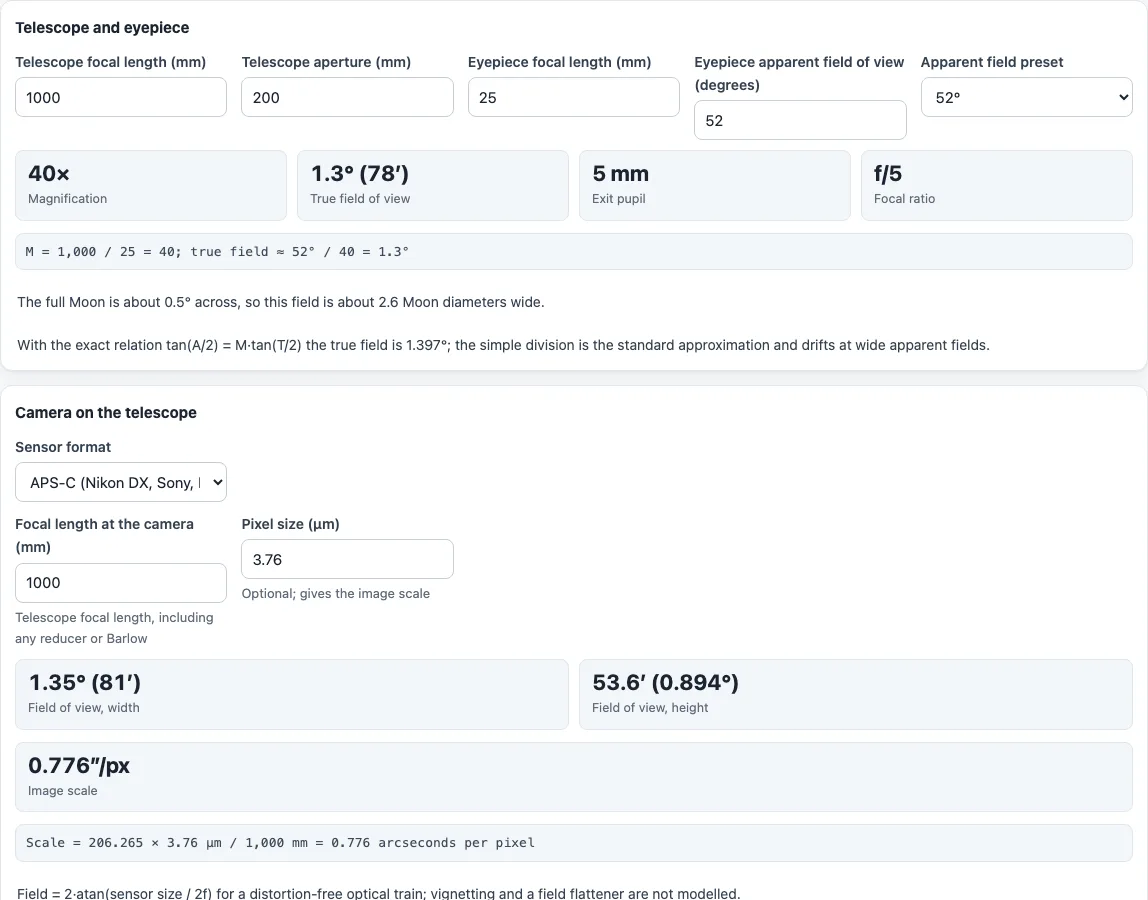
Example: a 1000 mm f/5 telescope (200 mm aperture) with a 25 mm eyepiece of 52° gives 40×, a true field of 1.30° (78′), an exit pupil of 5.00 mm and about 2.6 Moon diameters. APS-C (23.6 × 15.6 mm) at 1000 mm covers 1.35° × 0.89°, and 3.76 µm pixels give 0.776 arcseconds per pixel.
How do you calculate the field of view of a telescope?
Magnification is the telescope focal length divided by the eyepiece focal length. The true field is then the eyepiece apparent field divided by the magnification. Wikipedia’s article on eyepieces gives the example of a 25 mm eyepiece in a 1200 mm telescope, which is 48×. With a 52° eyepiece the true field is 52° / 48 = 1.08°.
How accurate is dividing the apparent field by the magnification?
Wikipedia states that this approximation is accurate to 4 % or better up to a 40° apparent field, with about 10 % error at 60°. The tool therefore also shows the exact relation from ISO 14132-1, tan(A/2) = M·tan(T/2). In the example above, the division gives 1.30° and the exact relation 1.397°.
What is true field of view and apparent field of view?
The apparent field of view is how wide the eyepiece view looks to your eye. The true field is how much sky it covers. The preset values are shortcuts for common eyepiece types, not product claims, so use the figure from your eyepiece’s specification when you have it. At the same 40×, the 52° example covers 1.30° and an 82° eyepiece covers 2.05°.
What is exit pupil and focal ratio?
Exit pupil is the telescope aperture divided by the magnification, which is the width of the light beam leaving the eyepiece. Focal ratio is the focal length divided by the aperture. Both are shown for your settings.
How wide is the field compared with the Moon?
The tool uses 0.5° for the full Moon and divides the true field by it. Wikipedia notes the Moon’s apparent size varies from about 29′ to 34′, so the count is approximate.
How is the camera field of view and image scale calculated?
The field is 2·atan(sensor size / 2f) for the sensor width and height at the focal length you enter. Image scale is 206.265 × pixel size in µm / focal length in mm, in arcseconds per pixel. Vignetting and a field flattener are not modelled.
What does the calculator not do?
It is not a sky simulator. It models no eyepiece field stop or distortion and gives no minimum or maximum useful magnification.
Frequently asked questions
Is the telescope field of view calculator free, and is anything uploaded?
It is free and needs no account. Everything runs in your browser, and nothing you type is uploaded.
Is this a telescope FOV simulator?
No. It returns numbers and a Moon-diameter comparison, not a picture of the sky.
How do I calculate the telescope field of view with a Barlow lens?
Enter the telescope focal length including the Barlow in “Telescope focal length (mm)”. The tool does not model a Barlow separately.
Which apparent field of view should I enter?
Use the figure from your eyepiece’s specification. If you do not have it, “Apparent field preset” offers 50°, 52°, 60°, 68°, 82° and 100° as shortcuts.
Why are there two true field values?
The main value is the standard division. The exact value comes from the ISO 14132-1 relation. They drift apart as the apparent field gets wider.
How is the magnification worked out?
Magnification is the telescope focal length divided by the eyepiece focal length. A 1200 mm telescope with a 25 mm eyepiece gives 48×, and the true field is the apparent field divided by that number.
Can I use it for a camera lens?
No. For camera lenses use the field of view calculator, which works from the sensor and focal length and gives scene width at a distance.
Related tools
- Field of view calculator is the version for camera lenses, with scene width at a distance.
- Angle of view calculator converts between focal length and angle of view for a sensor.
- Crop factor calculator gives the crop factor of a camera sensor.
- Exposure calculator keeps the same exposure while you change aperture, shutter time, ISO or an ND filter.