Time Lapse Calculator
Enter how long you will shoot and the interval to get the number of photos, the finished clip length and the card space.
A time lapse calculator turns three numbers into a plan: how long you will shoot, how often the camera takes a photo, and the frame rate of the finished video. This time lapse photography calculator returns the number of photos to take, the length of the clip, the speed-up compared with real time and, if you enter a file size, the memory card space the sequence needs. It also works the other way: tell it the clip length you want and it gives the photos and the shooting time required.
It runs in your browser, it is free, and nothing you type is uploaded. Use it before a shoot to pick an interval, check that the card is big enough, and avoid finding out at the edit that the clip is five seconds too short. It plans the numbers only; it does not set exposure or control your camera.
How to use the time lapse calculator
- Under “I know”, choose “How long I will shoot” or “How long I want the finished clip”.
- For “How long I will shoot”, type “Shooting time: hours” and “Shooting time: minutes”. For the other choice, type the “Finished clip length (seconds)”.
- Type the “Interval between shots (seconds)”, the time from one shot to the next.
- Choose the “Playback frame rate”: 24, 25, 30, 50 or 60 fps.
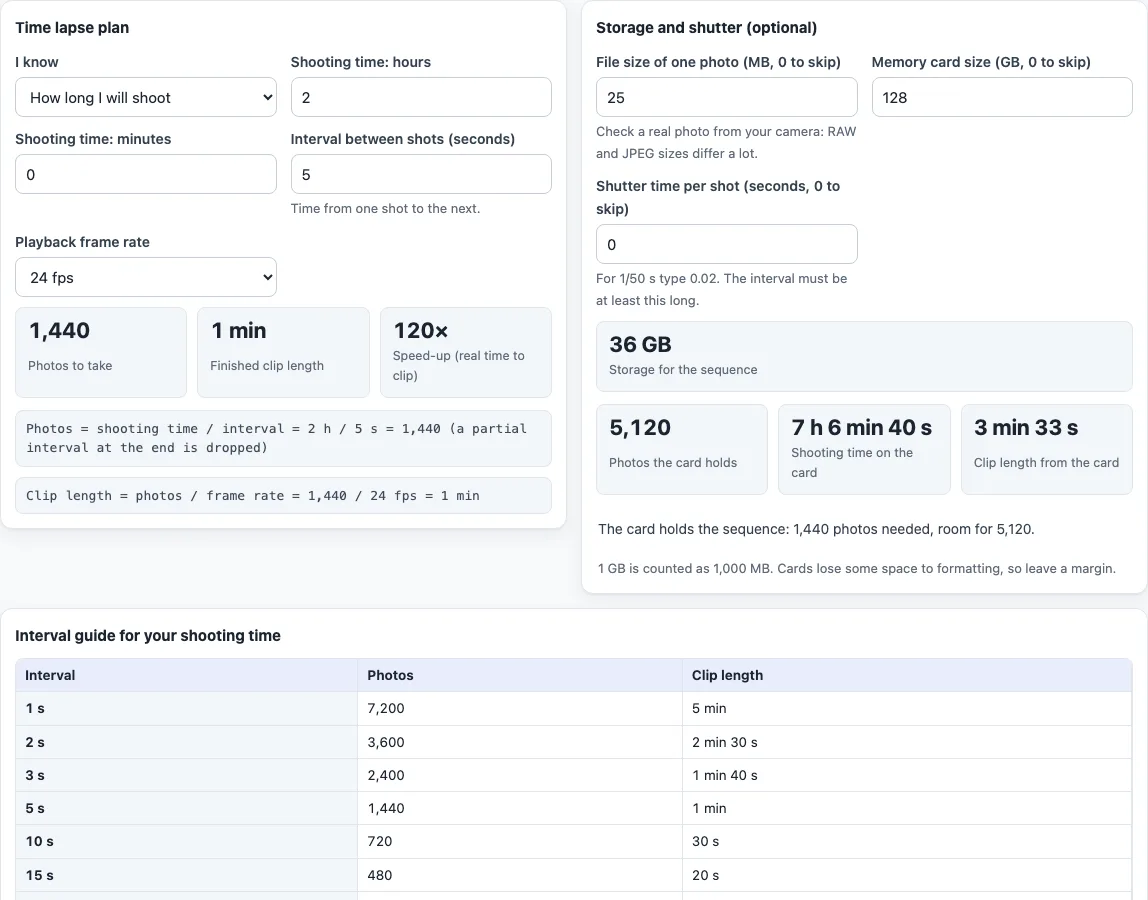
- Read the three big numbers. In the first mode they are “Photos to take”, “Finished clip length” and “Speed-up (real time to clip)”. In the second mode the clip length is replaced by “Shooting time needed”. The working is shown in plain lines under them.
- In “Storage and shutter (optional)”, enter the “File size of one photo (MB, 0 to skip)” and the “Memory card size (GB, 0 to skip)”. The tool shows “Storage for the sequence”, how many photos the card holds and whether it is big enough.
- Type the “Shutter time per shot (seconds, 0 to skip)” to be warned when the shutter is longer than the interval.
- Read the “Interval guide for your shooting time”: the photos and clip length you would get at intervals from 1 to 60 seconds.
Example: 2 hours at a 5 s interval and 24 fps gives 1,440 photos, a 1 min clip and a speed-up of 120×. The page address keeps your settings, so you can bookmark or share a plan.
How do you calculate a time lapse?
The number of photos is the shooting time divided by the interval, with a partial interval at the end dropped. The clip length is the number of photos divided by the playback frame rate. For 2 hours (7,200 s) at a 5 s interval you get 1,440 photos, and at 24 fps that is 60 seconds of video. The speed-up is the shooting time divided by the clip length, here 7,200 / 60 = 120 times real time. The general description in the Wikipedia article on time-lapse photography agrees: the apparent speed is the playback rate divided by the capture rate times the real speed, so capturing one frame a second and playing at 30 frames a second looks 30 times faster.
How long should a time lapse be to make a 30-second clip?
Multiply the clip length by the frame rate to get the photos, then multiply by the interval to get the shooting time. For 30 seconds at 25 fps you need 750 photos. At a 10 s interval that is 7,500 s, or 2 h 5 min of shooting. Choose “How long I want the finished clip” and the tool does this for you, rounding the photos up to a whole frame.
What interval should I use?
The interval sets how fast the scene seems to move. A short interval gives more photos and smoother, slower motion; a long interval speeds the scene up and needs fewer photos. The interval guide table shows the effect for your shooting time. This calculator does not recommend one interval for a subject, because the right choice depends on how fast things move in your scene, so use the table to compare. The interval must also be longer than the shutter time, or the camera cannot keep up.
How much card space does a time lapse need?
Storage is the number of photos times the size of one photo. 1,440 photos of 25 MB each take 36 GB, counting 1 GB as 1,000 MB. Check the real size of a photo from your camera, since RAW and JPEG files differ a lot, and leave a margin because a formatted card holds less than its label. The tool also shows how many photos the card holds and how long that lets you shoot.
Sources
- Wikipedia, Time-lapse photography (read 17 Oct 2026) — capture intervals, film projected at 24 frames per second, apparent speed = playback rate / capture rate × actual speed.
- Photos, clip length, shooting time and storage are arithmetic on the numbers you enter.
Frequently asked questions
How do I calculate the length of a time lapse video?
Divide the number of photos by the playback frame rate. 1,440 photos at 24 fps make a 60-second clip. The calculator gives this as “Finished clip length”.
How many photos do I need for a 10-second time lapse?
Multiply 10 by the frame rate. At 24 fps you need 240 photos, at 30 fps 300. Use “How long I want the finished clip” and the calculator also gives the shooting time for your interval.
What frame rate should I use for a time lapse?
It is the playback rate of your finished video. Common choices are 24, 25 and 30 fps, and the film frame rate is 24 per second. Use the rate of the video project you will put the clip in.
What is the best interval for a time lapse?
There is no single best interval. A shorter interval gives smoother motion and more photos, a longer one speeds the scene up. Compare intervals in the guide table for your shooting time and pick the look you want.
How big a memory card do I need?
Enter the file size of one photo and the card size under “Storage and shutter”. The tool shows the storage for the sequence and whether the card holds enough photos.
Is my data uploaded anywhere?
No. The calculator runs in your browser, nothing you type is uploaded, and it is free.
Related tools
- Exposure calculator gives equivalent aperture, shutter and ISO settings.
- Shutter speed chart lists shutter speeds and what they freeze.
- Sunny 16 rule calculator gives daylight settings without a meter.
- Exposure value calculator converts settings to EV and back.